Recent Discussions

AUDIT log not appearing for BRAPI access provision
Hi all, I am using the Business Rule to perform the user access provisioning using BRApi for security management. And used this BR in DAM job, added the DM to a task scheduler job to run it. All are working fine, but in the DASHBOARD -->NAVIGATION CENTER--> SECURITY AUDIT REPORTS --> USER CHANGE AUDIT. I cannot see the change line appearing in this report, executed by task scheduled for the DM (run by Business Rule.). Is there a way to enable the time in this report. apart from this i see the audit data and time in TOTAL USERS, USER LIST reports. -------------------------------------------------------- another important point i noted was ,those new user whoever i provisioned through the BR are uanable to authenticate. but when i make a small change like space or some modification in the user parameter save it. then undo the change and save it. they are able to authenticate the applciation.Alternate Entity hierarchies unbalanced
hello Team, good day; we have 4 alternate hierarchies for Entity dimension, the Application is for Consolidation, BS & IC, having the Balance sheet accounts balancing the amounts, the main hierarcy is balanced (means 0 asset, liability & equity), for all the rest aer unbalanced and the reazon could be the elimination accounts because these are not summing properly to 1st and 2nd level, (main parent and ancestor). the consolidation rule is custom and runing, maybe the conso properties are bad. Does anyone knows how to solve the unbalancing for all the Entity hierarchies? thakns in advance and Kind RegardsMarioGV2 days agoNew Contributor III13Views0likes0Comments
How can I use a Business Rule to sort a Member List in alphabetical order?
Namespace OneStream.BusinessRule.Finance.XFR_MemberListAlphabetical Public Class MainClass '--------------------------------------------------------------------------------------------------- 'Reference Code: XFR_MemberListAlphabetical ' 'Description: Use a business rule to sort a member list in Alphabetical order ' 'Usage: This will put a member list of a dimension in Alphabetical order. ' Use the following on the cube view: ' E#Member.[Name of Business Rule, Name of List in Business Rule] ' e.g. E#Root.[XFR_MemberListAlphabetical, EntityAlphabetical] ' 'Created By: Robert Powers (put in XF Ref by John Von Allmen) ' 'Date Created: 5-24-2013 '--------------------------------------------------------------------------------------------------- Public Function Main(ByVal si As SessionInfo, ByVal globals As BRGlobals, _ ByVal api As FinanceRulesApi, ByVal args As FinanceRulesArgs) As Object Try 'This will put a member list of a dimension in Alphabetical order. 'Use the following on the cube view: ' E#Member.[Name of Business Rule, Name of List in Business Rule] ' e.g. E#Root.[XFR_MemberListAlphabetical, EntityAlphabetical] Dim Memberlistname As String = "Ent_Sort" Dim MemberListstart As String = "E#[Total GolfStream].base" Select Case api.FunctionType Case Is = FinanceFunctionType.MemberList If args.MemberListArgs.MemberListName = Memberlistname Then Dim objMemberListHeader = New MemberListHeader( _ args.MemberListArgs.MemberListName) 'Read the members Dim objMemberInfos As List(Of MemberInfo) = api.Members.GetMembersUsingFilter( _ args.MemberListArgs.DimPk, MemberListstart, Nothing) 'Sort the members Dim objMembers As List(Of Member) = Nothing If Not objMemberInfos Is Nothing Then objMembers = (From memberInfo In objMemberInfos _ Order By memberInfo.Member.Name Ascending _ Select memberInfo.Member).ToList() End If 'Return Return New MemberList(objMemberListHeader, objMembers) End If End Select Return Nothing Catch ex As Exception Throw ErrorHandler.LogWrite(si, New XFException(si, ex)) End Try End Function End Class End Namespacejvonallmen2 days agoOneStream Employee19KViews6likes30CommentsSolution to Update Task Scheduler Start Times to Account for Daylight Savings
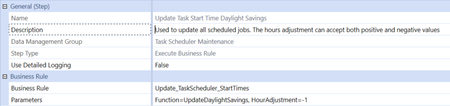
Hi, This time of year we have the common maintenance point regarding needing to update task scheduler start times to account for daylight savings. It is expected for the platform to not automatically update the task start times to account for daylight savings, thus, this becomes a maintenance point for those companies in states/countries that utilize daylight savings. Until this feature perhaps one day becomes available in the platform, we have a custom solution that will make the maintenance point of this easier for OS administrators. You can upload the two files attached in the zip file which will result in uploading an Extender business rule titled "Update_TaskScheduler_StartTimes" and a Data Management job called "Update Task Start Time Daylight Savings". To use the solution, navigate to the Data Mgmt page and look for the group titled "Task Scheduler Maintenance". Here you will find the Data Mgmt sequence and step you uploaded. Navigate to the DM step and utilize the Hour Adjustment parameter to push the task start times backwards (-1) or forward (1) one hour. Once you are happy with the Data Mgmt step setting, go ahead and run the Update Task Start Time Daylight Savings sequence. The sequence will update the task start time for all tasks in the application. We recommend testing this in a Development application first. Please perform this at your own risk in a Production application.NickKroppe5 days agoOneStream Employee5KViews12likes19Comments
Same Account Rolling to Different Parents Depending on Entity
Hi everyone, I’m currently building a OneStream application for a budgeting process and I’m facing a modeling challenge with account aggregation. The situation is the following: We have the same source account (for example 600000) across multiple entities. However, depending on the entity, the amount should roll up to different parent accounts in the reporting structure. Example: If Entity A loads Account 600000 = 1000, the amount should roll up to ParentA. If Entity B loads Account 600000 = 1000, the amount should roll up to ParentB. The key requirement is that I would like to keep only one account member (600000) in the Account dimension, without creating multiple target accounts such as 600000_A or 600000_B. Since the Account hierarchy in OneStream is static, I’m trying to understand what the best design approach would be to handle this type of entity-dependent aggregation. Has anyone implemented a similar requirement? What would be the recommended way to model this in OneStream while keeping a single account in the CoA? Any guidance would be greatly appreciated. Thanks in advance!jteixidor5 days agoNew Contributor76Views0likes1CommentWhat IMPORT should i use for the SECURITY updates for BRApi
Hi All, i am new to OneStream, i tried creating BR for Security automation. below is my entire code in OS-BR. Imports System Imports System.Collections.Generic Imports System.Data Imports System.Data.Common Imports System.Globalization Imports System.IO Imports System.Linq Imports Microsoft.VisualBasic Imports OneStream.Finance.Database Imports OneStream.Finance.Engine Imports OneStream.Shared.Common Imports OneStream.Shared.Database Imports OneStream.Shared.Engine Imports OneStream.Shared.Wcf Imports OneStream.Stage.Database Imports OneStream.Stage.Engine Namespace OneStream.BusinessRule.Finance.BR_UserManagement Public Class SecurityGroupHelper Public Sub ShowQAGroups(ByVal si As SessionInfo, ByVal api As FinanceRulesApi) Try ' Get all security groups using the API passed to the function Dim allGroups As GroupInfo = BRApi.Security.Admin.GetGroup(si, "QA_Admin") ' Loop through all groups and display a MessageBox for each that starts with "QA_" For Each grp As MemberInfo In allGroups If grp.Member.Name.StartsWith("QA_") Then MessageBox.Show(grp.Member.Name, "QA Group Found") End If Next Catch ex As Exception Throw ErrorHandler.LogWrite(si, New XFException(si, ex)) End Try End Sub End Class End Namespace --------------------------------------------------------------------------------------- I am getting error as below. i am not sure what mistake in the code. one i am sure about messagebox.show. Error compiling Business Rule 'BR_UserManagement'. 1) Error at line 27: Expression is of type 'GroupInfo', which is not a collection type. 2) Error at line 29: 'MessageBox' is not declared. It may be inaccessible due to its protection level.SolvedDK_OS6 days agoNew Contributor150Views0likes6Comments
How to update Global Time dynamically via BR
I am trying to write a BR to update the Global Time within the OS application. I see API function to get globaltime (BRApi.Workflow.General.GetGlobalTime). However, I don't see one for setting/updating global time. Is there a API to update the Global Time? I even searched the tables in the Database to see if I can manually update the record within a table, but didn't come across the table that contains the Global Time. Is there a way to update the Global time based on the system time? Thanks,csivark8 days agoNew Contributor5.1KViews1like10CommentsDynamicCalc - Return FX of Current Parent
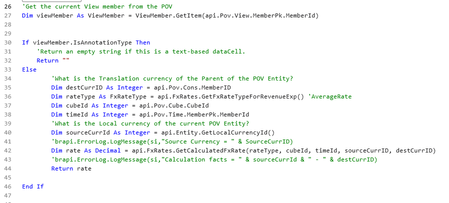
Good morning OneStream folks. I was looking for an example of how to dynamically pull the FX rate for an entity based on its current parent. We currently have a DynamicCalc account that assumes that all parents are USD and therefore the rate returned by the account is the USD translation rate. For example, the child is GBP and has a CAD parent, but the formula returns GBP-->USD. I was able to get a DynamicCalc formula that works, but I have to make some additions in my QuickView or CubeView to get it work completely. The account I created in this case is called ParentFX and the logic is below: In order to get the ParentFX account to return the correct value, I have to write my quickview logic as: A#ParentFX:C#Translated:Name(Parent FX). Which is fine, but I would also like to use that combo in a getdatacell calculation, and OneStream doesn't seem to like that. I'd like to be able to pull the A#ParentFX account with it using the Entity hierarchy as its guide for the parent FX instead of having to use the Cons hierarchy. Any ideas are appreciated.RossLikesOS8 days agoNew Contributor II39Views0likes0Comments
GetDataBufferUsingFormula
Can someone check if there's any mistake in the below 2 lines. I am unable to execute the BR Dim sourceBuff As DataBuffer Dim srcED As String = args.CustomCalculateArgs.NameValuePairs("sourceEffectiveDate") Dim selectedScenario = args.CustomCalculateArgs.NameValuePairs("selectedScenario") Dim dmTime = api.Pov.Time.Name Dim account = args.CustomCalculateArgs.NameValuePairs("account") sourceBuff = api.Data.GetDataBufferUsingFormula($"FilterMembers(T#{dmTime}:S#{selectedScenario}:U4#Approved_Status:U6#Total_Audit:U7#{srcED}, [A#{account}.Base])")jaideepk2610 days agoNew Contributor70Views0likes2CommentsPull in Variables from another BR
I'm trying to call a helper BR that I wrote to pull in two variables to denote our environment, but I'm getting an error message saying the extender business rule.MainClass is undefined. Background: Our GL has three environments, Dev, Prj (test) and PRD. As we promoted projects up in OneStream, I have to edit the BRs to reference the different environments. It's a pain when it comes to the SQL because the environment is part of the tableName.fieldName. Goal: to have one helper BR that has the environment variables in it and all other BRs reference this rule so I no longer need to edit them from environment to environment. The helper rule in DEV would reference the DEV tables, the helper in PRD would reference the production tables, etc. 'test code to pull in environment variables from a Helper 03-05-2026 'Define reference to business rule Dim JDE_EnvironmentHelper As New OneStream.BusinessRule.Extender.JDE_EnvironmentHelper.MainClass '<-- Update ReferencedBRName with your Business Rule 'Call function within referenced business rule If Not JDE_EnvironmentHelper Is Nothing Then Dim returnVariable As String = JDE_EnvironmentHelper.GetConnectionString(si, gateWay, envTbl) '<-- Update ReferencedBRFunctionName, param1..paramX, returnVariable type End If ' End test code 03-05-2026 The above code* is from the Connector rule that is to receive the variables, gateWay and envTbl. The error I get when I validate it is: Error at line 37: Type 'OneStream.BusinessRule.Extender.JDE_EnvironmentHelper.MainClass' is not defined. This code is directly copied from the OneStream snippets (modified for my BR name, of course) What am I doing wrong? Am I even on the right track? *line 3 above is line 37 in my BRBrooks12 days agoNew Contributor III70Views0likes4Comments