Recent Discussions

Automated Extraction of Transformation rules
We have a recurring requirement to share the transformation rules/logic on a regular basis with downstream teams or auditors. Currently, this is being done manually, which is time-consuming. Is there a way to automate the extraction/export of transformation rules? Some options I’m thinking of: - Can this be done via Business Rules (BR) / Decision Model (DM) modules? - Is it possible to extract or view all applied transformation rules directly through Cube Views? - Has anyone built an automated solution (e.g., a dashboard, cube view, report, or extender rule) to export/list all transformation rules in a readable format? Would really appreciate your thoughts or examples if you’ve implemented something similar. Thanks!prash40303 days agoNew Contributor III24Views0likes1CommentHow to copy a scenario from one application to another?
Hello, I recently recovered a scenario from a restored application copy from a point in time. I now would like to extract that scenario from the application copy and put that in our working application. Does anyone have any idea on how this would be done? Thank you, Jeremy MorganSolvedJmorgan8 days agoNew Contributor III1.9KViews0likes8Comments
Automate Data extract after consolidation
Hello, I have an extract I am looking to automate with the task scheduler. However, I am looking to also automate a run once a consolidation completes and also have the ability to cancel a scheduled export with a button if it is set at a time when a consolidation is taking place. Is it possible to accomplish this?rmbailey10 days agoNew Contributor24Views0likes1CommentComplex expression to remove currency symbols?
Hi all, we have a process to format data in the csv before it's imported into OneStream. This seems like extra work and I want to create a complex expression in the Data Source to remove this step. My excel formula is =VALUE(SUBSTITUTE(SUBSTITUTE(H9,"¥",""),",","")).... all the way down for column H or the Amt field import. I've tried putting this in the complex expression but I do not have the dimensions defined properly.... does anyone have an example or suggestions they can point me towards? thank you!!!m_b_b_1512 days agoNew Contributor III44Views0likes1Comment
XFGETCELL(), XFSETCELL() PERFORMANCE
Hi all, Every forecast cycle we get the same performance complaints from the same region group of users. They are always uploading massive amounts of data and refreshing massive amounts of data in the same workbooks using the XF functionality in Excel. To be clear, we have tried multiple times to convince them that they should be importing that data via CSV and advising that they will not get the same performance using the XF functions. We have also tried having OneStream re-index the databases before these cycles and we have regular daily app pool recycles. The OneStream data logs really don't show any significant refresh issues (less than 5 minutes usually) but the one user doing all this work is insisting that it's taking hours and hours to finish refreshing and they often have to close and reopen Excel and re-launch OneStream. We have raised multiple tickets and OneStream does not see any back end issues. We have looked at their Excel preferences and tried different options there but no improvement. I am 100% out of ideas so if anyone out there has any thoughts, would love to hear what you've done to resolve these issues. I'm going to post this as well somewhere in the community where Excel discussions happen. Thanks for any advice.kmd12 days agoContributor II39Views0likes1Comment
Cubeview Drill Down issue: Load Results for Importe Cells is empty
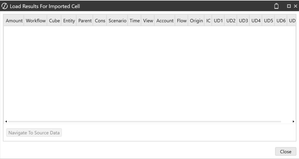
Hello there, We are having an issue when using the Drill Down option from a Cubeview, and it's that after getting to a base data cell within the Drill Down window, and then trying to navigate to stage using the "Load Results for Imported Cell", the results window is displayed empty: The workflow that is being used it's a simple Import, Validate and Load, that retrieves the imported data from a Connector and there is no further data processing once it's in the Cube. From the Workflow Page we can use Drill Down and Drill Back just fine. Any ideas of why is this happening? Thank you. OriolSolvedogonzalez15 days agoNew Contributor II48Views0likes4CommentsBusiness Rule within the Import Step
Hello, We have a custom business rule that does some account reversing we run centrally at the end our month end process. using a dashboard We're putting in a new lease process within OneStream and was wondering, is there a way instead of giving the front end user more steps within their workflow, that I can attach the business rule to the import step and once they run the "Load and Process" portion of the import step, the business rule will run? Thanks, WillSolvedWillVitale23 days agoContributor II59Views0likes3CommentsDefault load Method not sticking to replace - all time
Hi all We have come across an issue where the default load Method for workflow does not change from "replace" to "replace all time". Anyone has experienced the same issue? Thank you for your feedback NouriaNou23 days agoContributor4.9KViews0likes9Comments
Change Load method through connector code
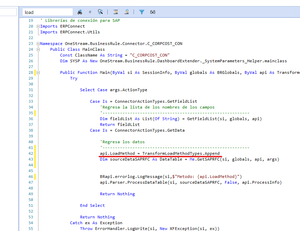
Hello everyone! Quick question. Does anybody know how to change the Load Method for a ProcessDataTable through the connector code? We have a dashboard where the user wants to choose the Load Method with a radio button. We are able to pass that parameter to the code and change the api.LoadMethod property to Append but the load still executes as Replace. The above works if we change the load method directly in the WF, but not from the codeNelly23 days agoNew Contributor1.1KViews0likes2Comments
Validation on Data Source: Restrict Entities to _PX Suffix and Metadata Text Contains PSC^
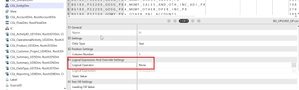
Hi Community, I’m working on a data load in OneStream and need to enforce two validations on the Entity dimension during the upload process: Entity name must end with _PX. Entity’s metadata Text field (e.g., Text1/Text2) must contain PSC^. (Basically Prevent data from being loaded to anything but a PSC entity) Currently, I see the Logical Expression and Override Settings on the Data Source column, but it seems limited to simple operators like Ends With or Like. My question is: Can this be achieved using a complex expression directly in the Data Source column settings? Or do I need to implement this as a Transformation Validate rule or a Data Source Business Rule? If a Business Rule is the right approach, could someone share a best-practice snippet for checking both conditions (including metadata lookup)? Should I create a conditional rule and add to the logical expression above?sahil25 days agoNew Contributor38Views0likes2Comments