Forum Discussion

SKVK
4 years agoNew Contributor III
Add users to view "Application" and "System" pane
Team
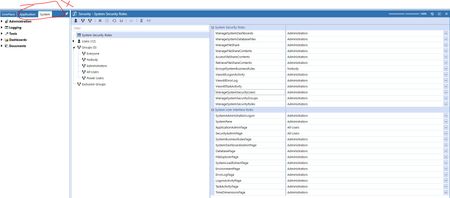
I have list of users who have been added to a group under Security rules. But they are able to see only "OnePlace" pane on the onestream , but not the Application and System.
Can you please...
 4 years ago
Hi,
Under the Application tab, you have Security Roles that contains the settings you want. Depending on exactly what you want them to do, you can create a security group for super-users and give them access in here. You might need to create another Parent group to use that includes the different groups you want to give access.
Peter
PeterFu
4 years agoContributor II
Hi,
Under the Application tab, you have Security Roles that contains the settings you want. Depending on exactly what you want them to do, you can create a security group for super-users and give them access in here. You might need to create another Parent group to use that includes the different groups you want to give access.
Peter

CubeView
3 years agoNew Contributor II
Hello - we have made a few changes to the Security Roles in this area, and are looking to find a report or dashboard that would show the date, time, and name of the admin who changed these settings (Application / Tools / Security Roles - specifically the Open Application setting).
Any idea if this activity is logged? I have reviewed the standard dashboard reports and am having no luck on finding an audit trail for these settings. Any suggestions are appreciated.
Related Content
- 2 years ago