Forum Discussion

Praveen
4 years agoNew Contributor
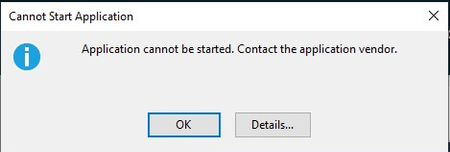
Application error
Hello Team, I am unable to open the OneStream application and getting "Application cannot be started" error after downloads. Expecting solution as soon as possible. Thank you. Regards, ...
 4 years ago
Hi Praveen,
You can try to clear your Clickonce cache. Please refer to https://onestreamsoftware.service-now.com/sp_cloud?id=kb_article_view&sysparm_article=KB0011265
 4 years ago
Log out of OneStream
Delete the Settings folder in the below path:C:\Users\USERNAME\AppData\Roaming\OneStream\Desktop\Settings
Delete the 2.0 folder in the below path:
C:\Users\USERNAME\AppData\Local\Apps\2.0
Thanks Sue for the tip!
NicolasArgente
4 years agoValued Contributor
What OS version are you using? The latest v7? as the installer for v7 as slightly change...
Have you tried installing from the app directly accessible from the marketplace?
Have you tried on another computer?
Please give kudos if it helps.
 Praveen4 years agoNew Contributor
The OS version is 6.6.0.12930.
we are accessing through URL.
In another computer it is working fine, some users are facing the issue.
- NicolasArgente4 years agoValued Contributor
Log out of OneStream
Delete the Settings folder in the below path:C:\Users\USERNAME\AppData\Roaming\OneStream\Desktop\Settings
Delete the 2.0 folder in the below path:
C:\Users\USERNAME\AppData\Local\Apps\2.0
Thanks Sue for the tip! - NicolasArgente4 years agoValued Contributor
I am 90% convinced that the issue is linked with the specific computers. It cannot be the server if if is working on other laptops.
Are those users admin on their laptops?
If laptops are part of a domain, can they install apps?
Have you tried from another network, another wifi, another hotspot?Have you tried to download the EXE client file from Marketplace and tried to install this one?
Please give kudos if it helps.
Related Content
- 6 months ago
- 2 months ago
- 2 years ago
- 2 months ago