Forum Discussion

Archana
1 year agoNew Contributor III
Cube View Group - Forms
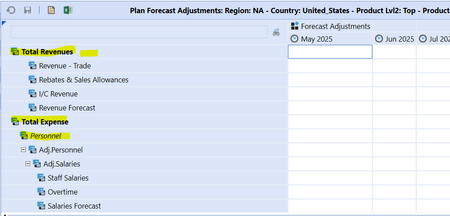
Hi, I'm trying to figure out how can I make few rows as un editable. Example: highlighted rows in below screenshot. I remember this can be done through Row overrides but its not working.
In co...

Henning OneStream Employee
1 year agoOneStream EmployeeHi, the V#Annotation member has been selected in the column. Is that correct? Seems like a possible mistake for "Forecast Adjustments" which I usually associate with data and not with comments.
If you change this to YTD or periodic, the parent accounts in the rows automatically become un-editable.
- Archana1 year agoNew Contributor III
Hi - Thanks for your response. I removed V#Annotation from column filter. Instead in POV only if I add Annotation for View the fields are editable. Otherwise the fields are locked.
- Henning1 year ago
Hi, I am not sure I follow what you did here exactly. I assume you mean every cell in the CV cannot be used for data input anymore? Annotations should not be used for data input just to get around blocked cells in a CV. The reason is in 99% of the cases that in one (or more) of the cell's dimensions, a parent cell or a no input cell has been selected. Make sure that for the input cells, all selected members are base members.
Annotation allows you to enter text into any intersection, also parents, so this looks like a solution, even though it is not (unless one wants to enter comments). Also, "Can Modify Data" only applies to data cells. Annotations are not "data" in the sense of that setting.
- Archana1 year agoNew Contributor III
Hi,
Thank you for your response. It was very helpful. Let me clarify the issue once again:
My requirement is to create a form for Forecast Adjustments, with four parameters defined: Region, Country, Product, and Department. These are set up as combo boxes in the components.
For the form, I am defining only one column, Forecast_Months, with a member filter consisting of two dimensions:
- S#|CVScenario|:Name(Forecast)
- XFBR(IDG_XFBR_Planning, ReturnPlanPeriodsCV, ScenarioName=|CVScenario|)
For rows, I have two rows defined:
- T_Revenue, with a member filter A#ADRV1:Name(Total Revenues)
- D_Revenue, with a member filter A#ADRV1.base
For the POV (Point of View), I have configured the following settings:
However, when I execute with these settings, the display appears incorrectly and does not allow me to use the form for data input.
I think this explains this issue better? Any guidance would be much appreciated.
thanks in advance
Related Content
- 1 year ago
- 2 years ago
- 2 years ago
- 2 years ago