The OneStream Community is temporarily frozen until June 29th due to the ongoing maintenance. Please read the blog post here to learn more.
Forum Discussion

TimVierhout
3 years agoNew Contributor III
Data cell Access security not working
Hi All,
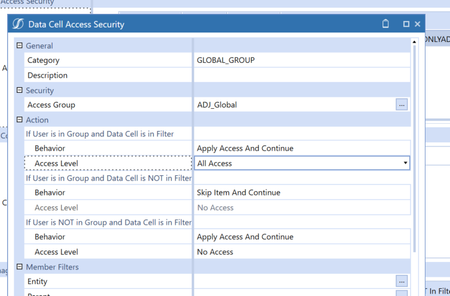
I am trying data cell access security to block access to specific UD1 members. These are members that should only be visible by global people. I have applied this:
For the UD1 filt...
 3 years ago
Hi Tim,
I suspect that you're missing a data cell access entry the removes access to U1#G_HQONLYREC and U1#G_HQONLYADJ for Everyone which is then followed by the filter you're showing above.
Also, I'm assuming that you've already enabled "Use Cube Data Access Security" on all entities i.e. this property that you see on entity members:
I'm actually thinking that you may not need to use Data Cell Access Security if you are simply wanting to carve out access to just 2 UD1 members. You can assign access on individual UD members using the Display Member Group property.
Cosimo
3 years agoContributor II
Hi Tim,
I suspect that you're missing a data cell access entry the removes access to U1#G_HQONLYREC and U1#G_HQONLYADJ for Everyone which is then followed by the filter you're showing above.
Also, I'm assuming that you've already enabled "Use Cube Data Access Security" on all entities i.e. this property that you see on entity members:
I'm actually thinking that you may not need to use Data Cell Access Security if you are simply wanting to carve out access to just 2 UD1 members. You can assign access on individual UD members using the Display Member Group property.
 SamRichards3 years ago
OneStream Employee
Hey Tim, I would also check that you took away all access to start. I would set it up taking away all access from everybody then grant back permissions.
 TimVierhout3 years agoNew Contributor III
Cosimo, thanks! That did the trick. Completely forgot about that setting.
The display member property would work for these two, but a level down we have a read only one as well.