The OneStream Community is temporarily frozen until June 29th due to the ongoing maintenance. Please read the blog post here to learn more.
Forum Discussion

AnthonyShenk
2 years agoNew Contributor III
Environment Formatting?
Hi OS Community,
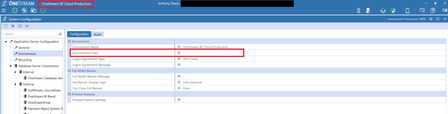
Was wondering if anyone has visibility into or can point me in the direction to update the Environment Color in an application?
I know it can be done, thinking it might be the...
- 2 years ago
Hi Anthony - Cloud customers can update this setting. You must first change the ManageSystemConfiguration role under System Security From Nobody to Administrators. After that you can uncheck the box on the Environment Configuration tab and enter your chosen Name and Color. The system has to be recycled for the change to be visible. You can do that yourself through the Environment tab or wait for the system to recycle overnight.

AnthonyShenk
2 years agoNew Contributor III
After contacting OS Support, you can only update through the app config file if you are on prem (which we are not).
Service Now team updated for us.

KeithBerry OneStream Employee
2 years agoOneStream EmployeeHi Anthony - Cloud customers can update this setting. You must first change the ManageSystemConfiguration role under System Security From Nobody to Administrators. After that you can uncheck the box on the Environment Configuration tab and enter your chosen Name and Color. The system has to be recycled for the change to be visible. You can do that yourself through the Environment tab or wait for the system to recycle overnight.
- AnthonyShenk2 years agoNew Contributor III
That worked perfectly! Thank you so much!
Related Content
- 2 years ago
- 3 years ago
- 1 year ago
- 3 years ago