The OneStream Community is temporarily frozen until June 29th due to the ongoing maintenance. Please read the blog post here to learn more.
Forum Discussion

jeffvdt
4 months agoNew Contributor III
Extend text properties beyond text 8
Hi All,
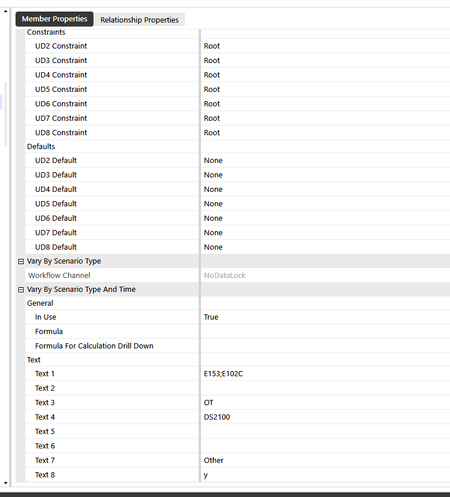
We have run out of text properties and are figuring out how to extend this and what the options are? Does anyone have some suggestions or ideas? Thanks in advance!
 4 months ago
I have never understood why implementors use Textn properties in such a manner.
It might be a little difficult to implement after the fact, but the most obvious solution (to me) is to store delimited PropertyName=Value pairs in the Textn properties. A Textn property can store up to 2GB of text, so you shouldn't need to worry about running out of space.
Example: Text1: Deptartment=Other,TransMethod=XYZ,Colors=[Green,White],LegalDesc=[XYZ, Inc.]
Not only can you store more than 8 things in member or 4 things in a Workflow, but the PropertyName also offers some clues as to what the Value means and what it might be used by, whereas Text8=Y (in your screen shot) offers no clues, and worse, where Text8 might be blank, does that mean it can safely be used for something?
You will need to build a function that can efficiently parse through and return the Value for a desired PropertyName. You should probably also build the function to allow Value to contain a delimited list of values, as I showed in the above example where I wrapped the value in [], which can also be used to store alternate descriptions that could include delimiters.
I have been using delimited PropertyName=Value pairs in OS for 10 years now. In many implementations, I can stack all PropertyName=Value pairs in Text1. The main reason I will utilize additional Textn properties is if certain PropertyName=Values pairs need to vary by ScenarioType/Time differently than other PropertyName=Value pairs. I have taken it to the next level by building a Text Property Manager where I centrally manage to what Textn a PropertyName has been assigned, such that if I find out down the road that the PropertyName needs to be moved, I can do so without changing any code.
rhankey
4 months agoContributor III
I have never understood why implementors use Textn properties in such a manner.
It might be a little difficult to implement after the fact, but the most obvious solution (to me) is to store delimited PropertyName=Value pairs in the Textn properties. A Textn property can store up to 2GB of text, so you shouldn't need to worry about running out of space.
Example: Text1: Deptartment=Other,TransMethod=XYZ,Colors=[Green,White],LegalDesc=[XYZ, Inc.]
Not only can you store more than 8 things in member or 4 things in a Workflow, but the PropertyName also offers some clues as to what the Value means and what it might be used by, whereas Text8=Y (in your screen shot) offers no clues, and worse, where Text8 might be blank, does that mean it can safely be used for something?
You will need to build a function that can efficiently parse through and return the Value for a desired PropertyName. You should probably also build the function to allow Value to contain a delimited list of values, as I showed in the above example where I wrapped the value in [], which can also be used to store alternate descriptions that could include delimiters.
I have been using delimited PropertyName=Value pairs in OS for 10 years now. In many implementations, I can stack all PropertyName=Value pairs in Text1. The main reason I will utilize additional Textn properties is if certain PropertyName=Values pairs need to vary by ScenarioType/Time differently than other PropertyName=Value pairs. I have taken it to the next level by building a Text Property Manager where I centrally manage to what Textn a PropertyName has been assigned, such that if I find out down the road that the PropertyName needs to be moved, I can do so without changing any code.
- KH12 months agoContributor III
OneStream Experts: Share Your Best QuickTips!
Please help by sharing with us how you've been using "Text n" via "QuickTips".
TY, rhankey.

Related Content
- 2 years ago
- 2 years ago
- 9 months ago