The OneStream Community is temporarily frozen until June 29th due to the ongoing maintenance. Please read the blog post here to learn more.
Forum Discussion

Elena
2 years agoNew Contributor II
Org-By-Period in multi-cube application
Has anyone gained experience with the 'org-by-period' consolidation in a multi-cube application? We are currently addressing changes in organizational structure. Specifically, we need to consolidate...
 2 years ago
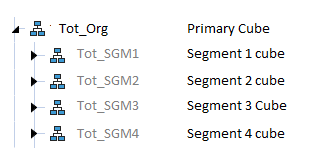
The recommended approach here would be to rename the entity in the old segment relationship to be a historical member and then create the entity in the new segment with the current name. Since the Entity is rolling to the Tot_Org from two different sub-cubes the org-by-period functionality cannot be applied. For this functionality to work with the appropriate multiple relationships and consolidation percent settings, the entity needs to reside in the same cube. From there the entity could have relationships to different parent cubes. So an option would be to have a 3 tiered cube structure, where the base entity would be connected to a higher level segment cube with varying time/consolidation properties.

JackLacava OneStream Employee
2 years agoOneStream EmployeeAre you typing out the parent name? That error message seems to have a space after "_", which would break the lookup. Try selecting members from the ellipses menu instead.
 Elena2 years agoNew Contributor II
Hi Jack,
I copy an entity and then use 'Paste Relationship (Add)' to the desired location. There's no chance for a typo.
The space in the error message is because I'm replacing the actual entity name in the screenshot.
- JackLacava2 years ago
Ok, I see what's happening: you're copying and pasting across a dimension that is composed of various dimensions, and your source and target dimensions are different. Yeah, you cannot do that.
What you can do, however, is:
- identify which dimensions actually contain the new parent and the new child (i.e. where each member is not greyed out). It's called the Member Dimension in member Properties, in this case it's "HoustonEntities":
- Open the Dimension that actually contains the parent
- Select the parent and click Add Relationship for Selected Member
- In the menu, select the child from the dimension that actually contains it.
You'll have to pay attention to not creating circular dependencies though. If you plan to continue using the same cubes where you already have data, data for the child member will still be stored in the same child cube.
- Elena2 years agoNew Contributor II
Thank you! That worked. I now have the entity in the desired place.
Related Content
- 1 year ago
- 10 months ago
- 2 years ago
- 4 years ago