Forum Discussion

Andy66
2 years agoNew Contributor
POV
How can I edit my GLOBAL POV?
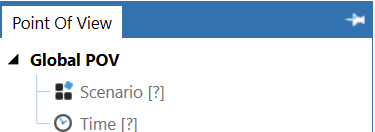
 2 years ago
Hi Andy, you can set those under Application >> Application Properties:
- 2 years ago
Hi, just a little addition, OneStream provides extensive documentation, which might be helpful as well:
https://documentation.onestream.com/1375907/Content/Index.html
The Global Point of View section is here:
https://documentation.onestream.com/1375907/Content/Design%20and%20Reference/Application%20Tools/General%20Properties.html
And as RobbSalzmann suggested in the other post, adding a meaningful header to posts in this community really helps everyone looking for a question identifying similar topics more easily and find an answer that has already been given much quicker. 🙂
Henning OneStream Employee
2 years agoOneStream EmployeeHi Andy, you can set those under Application >> Application Properties:
- Henning2 years ago
Hi, just a little addition, OneStream provides extensive documentation, which might be helpful as well:
https://documentation.onestream.com/1375907/Content/Index.html
The Global Point of View section is here:
https://documentation.onestream.com/1375907/Content/Design%20and%20Reference/Application%20Tools/General%20Properties.html
And as RobbSalzmann suggested in the other post, adding a meaningful header to posts in this community really helps everyone looking for a question identifying similar topics more easily and find an answer that has already been given much quicker. 🙂
Related Content
- 3 years ago
- 2 years ago
- 2 years ago
- 2 years ago