The OneStream Community is temporarily frozen until June 29th due to the ongoing maintenance. Please read the blog post here to learn more.
Forum Discussion

Manjunathak
1 year agoNew Contributor III
Retrieve Annotation as read only
Hi,
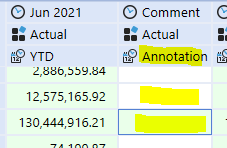
i'm retrieving the annotations in CV where as i could retrieve as read only for the account type dynamic calc(third row in screenshot) for account type Revenue still i cell is editable(first tw...

Manjunathak
1 year agoNew Contributor III
Hi,
i'm beginner, Can you please screenshot how can i change the accounts to be dynamic calc for only one column?
regards,
Manju

Henning OneStream Employee
1 year agoOneStream EmployeeHi,
you should not change your existing account types when data has been loaded. Not knowing much about your use case, the following is one (of the many) way(s) to go about it. This approach assumes UD8#None is used for all data input and comment collection.
First, you create a DynamicCalc UD8 member:
Then you add this member formula:
If api.View.IsAnnotationType Then
	Return api.Data.GetDataCellEx("UD8#None").DataCellAnnotation
Else
	Return api.Data.GetDataCell("UD8#None")
End If
You then go to the column2 definition of your Cube View and e.g. add your new UD8 member to the column's member filter:
Please note that this will apply to your entire column 2. Using overrides is more elegant and more pointed. But I am keeping it simple for now to show you the most basic way.
Overrides are those ones:
You should then be able to see the entered annotations and the original data in your CV, with the cells being no input.
In my example, the top half rows are using UD8#None in the point of view (POV) and the bottom half my new UD8 member. Please note that the way the formulas has been written, all data and / or comments will be pulled to be displayed in the CV, as long as those have been entered / loaded against UD8#None.
- Manjunathak1 year agoNew Contributor III
Hi,
UD8 member
formula for UD8 member
Cube view
Still the cells are open in report
Related Content
- 2 years ago
- 3 years ago
- 7 months ago
- 3 years ago
- 2 years ago