The OneStream Community is temporarily frozen until June 29th due to the ongoing maintenance. Please read the blog post here to learn more.
Forum Discussion

saustermiller
3 months agoNew Contributor
BI Viewer drill down without hidden data items
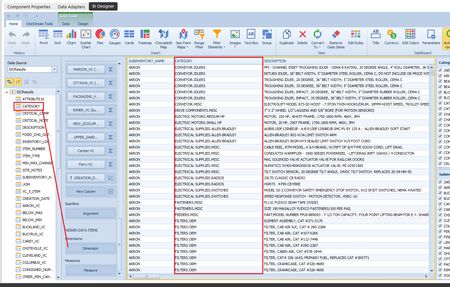
I'm trying to create a drill down in a BI Viewer dashboard using only a data set return. I can add a column (in this case "category") to both the Dimensions and Measures area. I then enable the dri...
 3 months ago
Answered my own question for Dimension vs Measure...
In OneStream BI Viewer, https://www.google.com/search?q=dimensions&ved=2ahUKEwi2i8b72JqTAxVf1RoGHTq1NSIQgK4QegQIARAC are qualitative, descriptive data points (e.g., Entity, Account, Time, Scenario) used for grouping, filtering, and defining the structure (rows/columns) of a report. https://www.google.com/search?q=measures&ved=2ahUKEwi2i8b72JqTAxVf1RoGHTq1NSIQgK4QegQIARAD are quantitative, numerical data points (e.g., Sales, Amount) that are aggregated, summed, or calculated, forming the cell data in a grid or chart.
Key Differences:
- Function: Dimensions provide context (labels), while Measures provide values (metrics).
- Behavior: Dimensions group data without summarizing. Measures perform summary calculations like Sum, Average, or Count.
- Usage: In a Grid component, dimensions are typically assigned to row/column headers, while measures populate the cells.
- Data Type: Dimensions are often strings or dates. Measures are numeric.
For instance, in a sales dashboard, "Product Category" is a dimension, and "Total Revenue" is a measure.
saustermiller
3 months agoNew Contributor
Answered my own question for Dimension vs Measure...
In OneStream BI Viewer, https://www.google.com/search?q=dimensions&ved=2ahUKEwi2i8b72JqTAxVf1RoGHTq1NSIQgK4QegQIARAC are qualitative, descriptive data points (e.g., Entity, Account, Time, Scenario) used for grouping, filtering, and defining the structure (rows/columns) of a report. https://www.google.com/search?q=measures&ved=2ahUKEwi2i8b72JqTAxVf1RoGHTq1NSIQgK4QegQIARAD are quantitative, numerical data points (e.g., Sales, Amount) that are aggregated, summed, or calculated, forming the cell data in a grid or chart.
Key Differences:
- Function: Dimensions provide context (labels), while Measures provide values (metrics).
- Behavior: Dimensions group data without summarizing. Measures perform summary calculations like Sum, Average, or Count.
- Usage: In a Grid component, dimensions are typically assigned to row/column headers, while measures populate the cells.
- Data Type: Dimensions are often strings or dates. Measures are numeric.
For instance, in a sales dashboard, "Product Category" is a dimension, and "Total Revenue" is a measure.
Related Content
- 2 years ago