Forum Discussion

Jones
1 year agoContributor
Change display name on view member
Hey all,
So i'm trying to solve the display name of a view member in a cubeview column.
I manage to change the display name by using Delimited List by changeing display name in parameter dropdown...
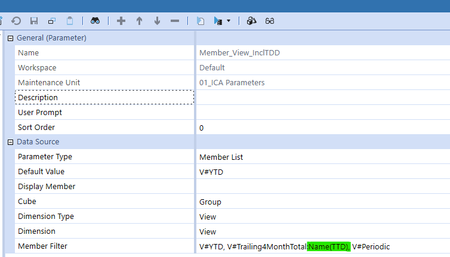
 1 year ago
if you're putting it in the CV POV though i dont think the Name part will work anyway. You'll need to put this in the columns for that.
KarlT OneStream Employee
1 year agoOneStream EmployeeYou could try a delimited parameter something like this:

Jones
1 year agoContributor
Hey, thanks for quick response.
I did try something simlar and it's not working for the cubeview. It works for the param dropdown however.
The cubeview dosen't like the "V#" from the delimited list. That's why I ended up trying the Member list (That diden't work as I hoped either) 😞
The cubeview ends up empty like this:
- KarlT1 year ago
It'll depend where you're putting the parameter. If in the CV POV then just remove the V# from the parameter Values. If in the rows and columns you will need to either include the V# in the parameter or in the member filter directly
- KarlT1 year ago
if you're putting it in the CV POV though i dont think the Name part will work anyway. You'll need to put this in the columns for that.
- Jones1 year agoContributor
thanks man! that worked excellent! Diden't know CW Top diden't allow changes in string. Moving it to the column solved the issue!
Related Content
- 1 month ago