Forum Discussion

CAOK
3 years agoNew Contributor II
Cube-view: Calculate a column based on a calculated row
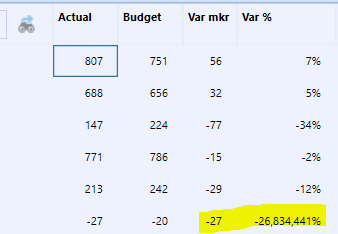
My Cube view has entities in rows. One of the rows is a sum of several entities ( E#A1+E#A2+E#A3). In the 4 columns I have Actual, Budget, Variance and Variance%. Variance and Variance % being calcul...
- 3 years ago
Use Row Overrides on your two columns (Var mkr and Var %). You should be able to just copy the exact Member Filter you have in Member Expansion 1 and paste that into the Row Overrides below. Then just put the name of the row(s) you need to override in the Row Range.


JackLacava OneStream Employee
3 years agoOneStream EmployeeHi CAroline,
Can you post the definition of that column, please...? In theory, if you're referring to column values through CVC, it should reference the summed value.
 CAOK3 years agoNew Contributor II
In theory yes, but I don't think it references the summed value - I have had problems with this before. The definitions are for column 3: GetDataCell(CVC(actual)-CVC(budget)):Name(Var mkr) and for column 4: GetDataCell(VariancePercent(CVC(actual), CVC(budget))):Name(Variance %) It works for all rows escept for the row that instead of one Entitymember has the definition GetDataCell("E#DK+E#FR+E#SF"):Name(Other Entities)
- aricgresko3 years agoContributor III
Hi - look at my comment below from yesterday. Your response to Jack confirms my thought of needing an override. Basically, you have two GetDataCell functions intersecting with each other. The override should resolve your issue.
Let me know if that does the trick!
Related Content
- 2 years ago
- 2 years ago
- 8 months ago