Forum Discussion

CAOK
3 years agoNew Contributor II
Cube-view: Calculate a column based on a calculated row
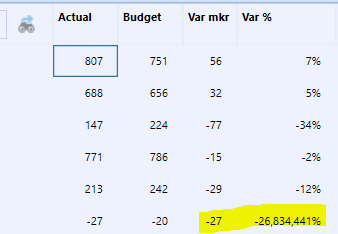
My Cube view has entities in rows. One of the rows is a sum of several entities ( E#A1+E#A2+E#A3). In the 4 columns I have Actual, Budget, Variance and Variance%. Variance and Variance % being calcul...
- 3 years ago
Use Row Overrides on your two columns (Var mkr and Var %). You should be able to just copy the exact Member Filter you have in Member Expansion 1 and paste that into the Row Overrides below. Then just put the name of the row(s) you need to override in the Row Range.

CAOK
3 years agoNew Contributor II
OK, what would that column override look like? And in that case I suppose I could not combine column and row templates because I would have to hard-code the override?

aricgresko
3 years agoContributor III
Use Row Overrides on your two columns (Var mkr and Var %). You should be able to just copy the exact Member Filter you have in Member Expansion 1 and paste that into the Row Overrides below. Then just put the name of the row(s) you need to override in the Row Range.
- CAOK3 years agoNew Contributor II
Thanks! It works - not sure why though, is it that by setting it as an override I set the calc order in the CV so that these columns are calculated after the rows?
Related Content
- 2 years ago
- 2 years ago
- 8 months ago