Forum Discussion

FM
3 years agoNew Contributor III
Cube View formatting mixed dimensions
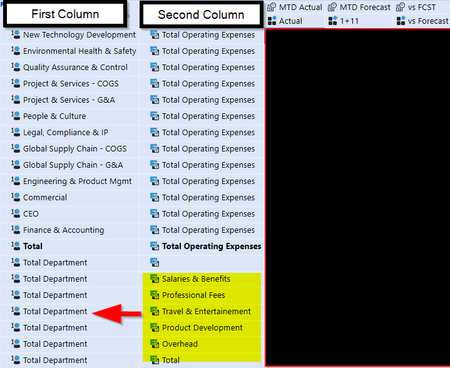
I have a Cube View that is displaying a single dimension in the first column (Departments), and a second dimension (Accounts) in the second column.
In order to match the formatting of th...
 3 years ago
Use:
UD1#Something:name(|MFAccount|) (or UD1#Something:name(|MFAccountDesc|))
A#SomethingElse:name(|MFUD1|) (or A#SomethingElse:name(|MFUD1Desc|))
where needed.
- 3 years ago
Christian's comment above should work and essentially what I'm going to add a little bit of extra color to. I have a very similar use case to the example you provided.
I would only use Member Expansion 1 in your Rows. If you use your Department dimension in Member Expansion 1 and your Account dimension in Nested Member Expansion 2, you'll have those two columns appear.
Let's assume UD1 is Department in your case, I would recommend the following.
For everything to the bolded Total row you showed, use the following: U1#TotalDepartment.base:A#OPEX:Name(|MFUD1Desc|)
For everything below the bold, use the following: U1#TotalDepartment:A#OPEX.base:Name(|MFAccountDesc|)

aricgresko
3 years agoContributor III
Christian's comment above should work and essentially what I'm going to add a little bit of extra color to. I have a very similar use case to the example you provided.
I would only use Member Expansion 1 in your Rows. If you use your Department dimension in Member Expansion 1 and your Account dimension in Nested Member Expansion 2, you'll have those two columns appear.
Let's assume UD1 is Department in your case, I would recommend the following.
For everything to the bolded Total row you showed, use the following: U1#TotalDepartment.base:A#OPEX:Name(|MFUD1Desc|)
For everything below the bold, use the following: U1#TotalDepartment:A#OPEX.base:Name(|MFAccountDesc|)

TomGardner
1 year agoNew Contributor
I know this is 3 years old but hoping maybe I still get a reply.
I'm experiencing the same issue.
For the row that says "Pit & Front End Operations" I am using this filter: A#OpExp:U1#FrontEnd.Base:Name(|MFUD1Desc|)
But the report seems to be ignoring the expansion and only showing me the member U1#FrontEnd.
I was just assuming that I couldn't do an expansion on the U1 when Account is my primary row dimension. But hoping there is a way. Any ideas?
Thanks!
Related Content
- 3 years ago