The OneStream Community is temporarily frozen until June 29th due to the ongoing maintenance. Please read the blog post here to learn more.
Forum Discussion

Ole_S_P
1 year agoNew Contributor III
Drill down Chart in BI Viewer.
Hi
I have a problem with dril Down in BI Viewer.
Part of our UD1 is as follows:
BU1000 - EGMONT GROUP
BU1500 - Other Business line
...
 1 year ago
Hi
I have finally found a solution that is working. Thanks for the help.
Definition of Column in Cube View:
It is important to use Base. I this case ”Where(Text7=’ ’)” is used to exclude joint ventures and associates.
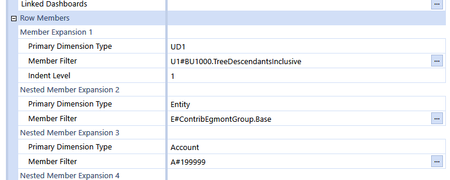
Definition of Row in Cube View:
IMPORTANT: It does not work using TreeDescendantsInclusiveR
Data adapter:
As Columns is base only use Outermost Row. It will only work if I loop on UD1.
Bi Viewer:
I have made a calculated field with RecOK with the formula: iif([Amount]<>0,'Value','Zero'). By this I can remove all companies with no amount in the drill down.
The chart has the following filter:
The UD1 levels should be sorted on amount:
After sorting in reverse orden the graph looks like this. I can now drill down to sublevels in UD1 and finally end in a specification on Entity.

ckattookaran
1 year agoValued Contributor
The pivot table is not aware of financial functions, it is just like EXCEL pivot. I see three different levels of totals in that one. The same goes for Charts. What is the data adapter, and how does it look when you run it in Workspaces/Dashboards?
Ole_S_P
1 year agoNew Contributor III
Hi
Data adapter:
Loaded into dashboard it does not change anything:
It is correct that it has subtotals, but they are important when drilling down.
Regards
Ole
Related Content
- 4 years ago