The OneStream Community is temporarily frozen until June 29th due to the ongoing maintenance. Please read the blog post here to learn more.
Forum Discussion

RandyThompson
3 years agoNew Contributor III
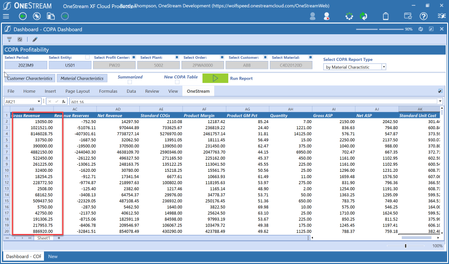
How can we show commas as the thousand separator in a numeric Table View column
We are trying to format numeric columns in a Table View but haven't been successful. The numeric columns are currently appearing as 999999.99 instead of the desired 99,999.99. Are Table View currentl...

ckattookaran
3 years agoValued Contributor
Randy, you will have to get rid of the column format and use the populate from data table option with the keep format from data boolean.

RandyThompson
3 years agoNew Contributor III
Thanks, Celvin. Unfortunately I can't find any documentation on this. Can you share a snippet of code of how to use the populate from data table. Thanks.
- JackLacava3 years ago
OneStream Employee
Didn't test this but it should work.
' assuming yourDataTable will have been obtained already Dim includeColHeaderRow as Boolean = True Dim useDataTypes as Boolean = True ' try switching this on/off to compare results args.TableView.PopulateFromDataTable(dataTable, includeColHeaderRow, useDataTypes) return args.TableView sfilho3 years agoNew Contributor III
Hi Jack,
Where I should create the datatable? Is the datatable a different table view?
Thx
- JackLacava3 years ago
DataTable is an object representing an SQL-like table in memory. It's a standard .Net class. For a simple example, check out this blog post - it's for Dashboard DataSets, but around halfway through it shows a simple example of querying a database to get a DataTable object. You can also check out https://learn.microsoft.com/en-us/dotnet/framework/data/adonet/dataset-datatable-dataview/creating-a-datatable or just search this forum, there are plenty of examples. Note that you don't have to perform a database query to get a DataTable, they can be created in memory from scratch.

Related Content
- 3 years ago
- 1 year ago