The OneStream Community is temporarily frozen until June 29th due to the ongoing maintenance. Please read the blog post here to learn more.
Forum Discussion

SamKing
3 years agoNew Contributor III
Member list parameter formatting
Hi,
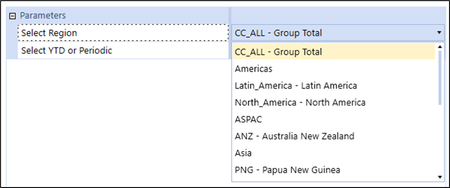
Is there a way to format the options in a member list parameter to only display the member description? I've tried using :Name(|MFUD1Desc|) but this doesn't change the outcome visible to the en...
 3 years ago
Hi SamKing: this is controlled by the 'Display Member' field in the Parameter Settings. Valid options are:
- Name
- Description
- Name and Description
Name here means MemberName and Description means MemberDescription. Change to 'Description' and you should be all set.
Cheers -db
db_pdx
3 years agoValued Contributor
I don't believe there is a way to format individual items within the list of values that are displayed in the combo box. The formatting parameters would apply to the entire combo box.
However, you could do some visual indentation as a potential method for achieving your desired result. Reference post here: Question: Can I create a dashboard dropdown or list box which contains a representation of a hierarchy with indentation? - OneStream Community (onestreamsoftware.com)
This is definitely on the advanced side. It takes advantage of Bound List parameters which can have a Display value be a unique/arbitrary representation of the selection while returning the MemberName for consumption by the result of the dashboard components.

SamKing
3 years agoNew Contributor III
Thanks - whilst not ideal it will better outline the hierarchy to users who aren't as well-versed in the corporate structure.
Related Content
- 2 years ago
- 1 year ago
- 1 year ago
- 3 years ago