The OneStream Community is temporarily frozen until June 29th due to the ongoing maintenance. Please read the blog post here to learn more.
Forum Discussion

tedetherington
2 years agoNew Contributor II
Adjust single variable in Quick View for one line only
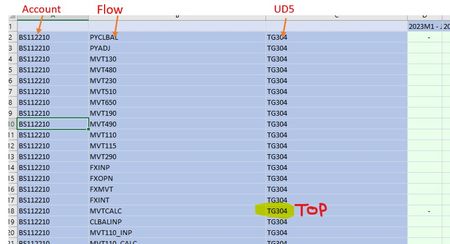
Hello, I am building a Quick View with the columns Account, Flow and UD5 - for UD5 I want "TG304" for all rows other than when the flow is "MVTCALC". Is it possible to have this level of variance i...
 2 years ago
You can get the data you are looking for, but without the ud5 column. If this is not an issue, you can use multidimensional statements for the Flow filter including the ud5 specification.
The Flow Filter setting would look like this: F#pycybal:Ud5#TG304, ..., F#fxint:Ud5#tg304, F#MVTCALC:Ud5#Top, F#clbalinp:Ud5#TG304
with the name keyword, |MFFlow|, |MFUd5| or |MFFlowDesc|, |MFUd5Desc| , you even can show a combined row header: F#pycybal:Ud5#TG304:name(|MFFlow| - |MFUd5|), ..., F#fxint:Ud5#tg304:name(|MFFlow| - |MFUd5|), F#MVTCALC:Ud5#Top:name(|MFFlow| - |MFUd5|), F#clbalinp:Ud5#TG304:name(|MFFlow| - |MFUd5|)
I don't have your metadata, but it would look like this:
But if you hard code it like this, why not convert the quickview to functions and then just replace the mvtcalc formula's pov with Ud5#top?
I hope this helps and cheers
Christian

kenostrovsky
2 years agoNew Contributor III
I am pretty certain that is not possible. One option around this would be to use XF formulas to pull data into excel. That way you would have complete flexibility on the dimension used for each row. Another is a separate QuickView for MVTCALC Flow member. I agree - both are not the most convenient solutions.
Related Content
- 3 years ago
- 2 years ago