Forum Discussion

xtensibilitybro
4 years agoNew Contributor III
Report Header - Report Title Placement
Hi All,
Thanks in advance for the help on this. I am looking for configure the Report Title in a cube to to be aligned left rather than center. In the screenshot below I would like "Consolidate...
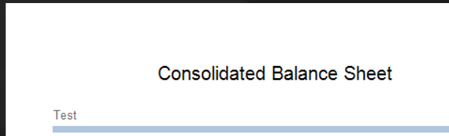
 4 years ago
Hi Amar,
Try this:
Dim uiItem As CVExtenderReportUIItem = args.Report.CurrentUIItem
If uiItem.UIItemType = XFReportUIItemType.PageHeaderLabelTitle
uiItem.Visible = True
uiItem.TextAlignment = 2 'BottomLeft
uiItem.Left = 1
End If
TextAlignment has an enumerated list deep in the API Details & Database Documentation. .Left I actually didn't find in the documentation but guessed on a test value and it seemed to work.
Note for my reports, this ended up overlapping with the default logo position. So, the other option you might consider is putting this Page Header text in the Subtitle Left 1 section and shifting your other text ("Test") to Subtitle Left 2.
Cheers,
-DB
db_pdx
4 years agoValued Contributor
Hi Amar,
Try this:
Dim uiItem As CVExtenderReportUIItem = args.Report.CurrentUIItem
If uiItem.UIItemType = XFReportUIItemType.PageHeaderLabelTitle
uiItem.Visible = True
uiItem.TextAlignment = 2 'BottomLeft
uiItem.Left = 1
End If
TextAlignment has an enumerated list deep in the API Details & Database Documentation. .Left I actually didn't find in the documentation but guessed on a test value and it seemed to work.
Note for my reports, this ended up overlapping with the default logo position. So, the other option you might consider is putting this Page Header text in the Subtitle Left 1 section and shifting your other text ("Test") to Subtitle Left 2.
Cheers,
-DB

kakouchtim
4 years agoNew Contributor III
Hi guys,
I am having a similar issue where i'd like to align my report header on the left (however I need it for the excel export). db_pdx Where can I exactly copy paste the formula that you shared ?
Many thanks for your help!
-Adam
- db_pdx4 years agoValued Contributor
Hi kakouchtim:
This is in a Cube View Extender business rule under the: Case Is = CVExtenderFunctionType.FormatReportUIItem.
You'll need to apply the rule to a Cube View report under the: General Settings > Report > Custom Report Formatting > Business Rule. However, please note, this does not appear to change the Excel Export formatting; so I don't believe this satisfies your need. Hopefully someone else has an idea on this.
-DB
Related Content
- 2 years ago
- 3 years ago
- 3 years ago