Forum Discussion

CAIGuySeanF
4 years agoContributor
Reporting - Books - File (xfDoc)
Hello,
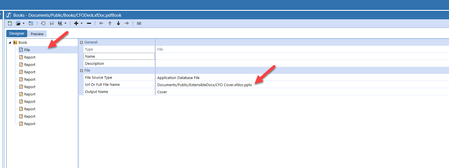
I would like to create a report book that includes several cube views and an xfdoc (ppt cover page).
I added the xfdoc as an application database file and pointed it to the working URL. ...
 4 years ago
Hi Sean,
I did some further testing this morning and found you can use '.docx' files and they will work for PDF books. With this being the case, I'd actually recommend using the "Text Editor" page in OneStream. You can utilize dynamic parameters that will present the current date (e.g. '|WFTime|' will return '2022M5'). Below I created a quick example of this. You can see the dynamic parameters pulling in my Workflow time. I just saved this file to the File Explorer with the same '.xfdoc.docx' naming convention and added it to my book as the first file.
Let me know if you have any trouble with this or have any further questions!
Kelly_Reed OneStream Employee
4 years agoOneStream EmployeeHi Sean,
I think the issue is the book is a PDF book. Therefore, it's only going to return PDF docs. If you want a "mixed media" book, (PPT + PDFs), you would need to save it as a "Zip" book (Book.xfdoc.zipbook).
For your purposes here, I would save the ppt as a PDF (CFO Cover.xfdoc.pdf), then use that instead of the 'CFO Cover.xfdoc.pptx'. That should work for you.
Hope this helps!

CAIGuySeanF
4 years agoContributor
Thanks Kelly. That appears to be the missing piece. However, I have some xfgets (dates) in my cover page, so I think I need to leave that as a PPT for the extensible formula/function to work.
I tried the zipbook option, but it doesn't seem to retain ordering or put them together as one doc?
Is my best bet for one "PDF Doc" to build a cover page using a cube view with no data?
- Kelly_Reed4 years ago
Hi Sean,
I did some further testing this morning and found you can use '.docx' files and they will work for PDF books. With this being the case, I'd actually recommend using the "Text Editor" page in OneStream. You can utilize dynamic parameters that will present the current date (e.g. '|WFTime|' will return '2022M5'). Below I created a quick example of this. You can see the dynamic parameters pulling in my Workflow time. I just saved this file to the File Explorer with the same '.xfdoc.docx' naming convention and added it to my book as the first file.
Let me know if you have any trouble with this or have any further questions!
- CAIGuySeanF4 years agoContributor
This is great! After creating a file in the Text Editor and using that '.xfdoc.docx' naming convention, I get the following error message.. am I doing something wrong?
- Kelly_Reed4 years ago
Oh interesting. At what exact point in the process did you get that error? Right after you hit 'OK' on this screen?
 BrittaniaH2 years agoNew Contributor II
I am trying to add a cover to a book. This post is fantastic, but I am not able to find where I can add a file in my cubeviews. I am wondering if we might be on an early version of OneStream or if I am just doing something incorrect. Can you tell me what version you are running. Thank you.
- CAIGuySeanF2 years agoContributor
Hey. We are currently running 7.2.4. Once the file (xfdoc.docx) was imported through the File Explorer, I'm adding the file within Books. Screenshot below. Hope this helps!
Related Content
- 4 years ago