The OneStream Community is temporarily frozen until June 29th due to the ongoing maintenance. Please read the blog post here to learn more.
Forum Discussion

aprats
3 years agoNew Contributor II
Table View Numer Formatting
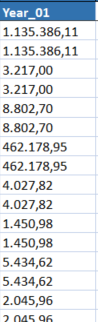
Hi all, I have an issue with table view number formatting. On my SQL query, I'm introducing the format: Select FORMAT (Sum(Year_01), 'N2', 'es-es') as Year_01 ") After that, I populate the table ...
 3 years ago
Hi MikeG and JackLacava ,
After beeing testing a lot of different options, I have solve it. JackLacava you was right. If I use FORMAT in my SQL, the column is stored as Text and it's imposible to solve the issue.
At last, the way to obtain the column in number format has been this one:
1. Define the text columns as Decimal. In my case, the columns that contains "Year":
2. After that, the system is making an error derivated from the culture. I don't know why exactly, but if you are using ',' as decimal and '.' for thousands (for example: 1.150,12), the table view shows 115012. It seems that it can't be able to read ',' as decimal separator.
3. To solve it, when I'm inserting the rows, for number columns, I'm replacing ',' for '.'.
Whit this, the system understand that the '.' is the decimal separator and it shows perfectly. The only thing left is the thousand indicator. I don't find a way to solve it.
Hope it help you!
Albert
aprats
3 years agoNew Contributor II
Hi MikeG and JackLacava ,
After beeing testing a lot of different options, I have solve it. JackLacava you was right. If I use FORMAT in my SQL, the column is stored as Text and it's imposible to solve the issue.
At last, the way to obtain the column in number format has been this one:
1. Define the text columns as Decimal. In my case, the columns that contains "Year":
2. After that, the system is making an error derivated from the culture. I don't know why exactly, but if you are using ',' as decimal and '.' for thousands (for example: 1.150,12), the table view shows 115012. It seems that it can't be able to read ',' as decimal separator.
3. To solve it, when I'm inserting the rows, for number columns, I'm replacing ',' for '.'.
Whit this, the system understand that the '.' is the decimal separator and it shows perfectly. The only thing left is the thousand indicator. I don't find a way to solve it.
Hope it help you!
Albert
Related Content
- 3 years ago