The OneStream Community is temporarily frozen until June 29th due to the ongoing maintenance. Please read the blog post here to learn more.
Forum Discussion

Hamza
1 year agoNew Contributor II
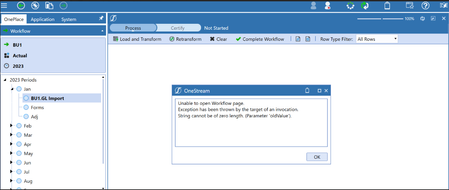
Error when accessing the Workflow Import step
Hi Everyone, I was recently working within a Demo Environment where I suddenly started getting error message when trying to access the import step in the Load and Transform (Import) step in the Imp...
 9 months ago
The cause of the issue was identified to be that the 'FileShareRootFolder' in the configuration was blank.
Check under System -> Environment -> <server name> -> Configuration -> FileShareRootFolder.
If it is blank you need to create a file share folder (e.g. D:\Onestream\Fileshare) on the application server and update your Application Config file to point to the new folder. Then restart the application.
yhussien
9 months agoNew Contributor II
The cause of the issue was identified to be that the 'FileShareRootFolder' in the configuration was blank.
Check under System -> Environment -> <server name> -> Configuration -> FileShareRootFolder.
If it is blank you need to create a file share folder (e.g. D:\Onestream\Fileshare) on the application server and update your Application Config file to point to the new folder. Then restart the application.
Related Content
- 2 months ago