The OneStream Community is temporarily frozen until June 29th due to the ongoing maintenance. Please read the blog post here to learn more.
Forum Discussion

Ricardo_Mil
3 years agoNew Contributor II
Import files from FTP Connection
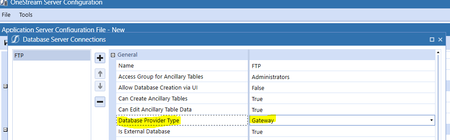
Hello, I'am newly at OneStream and now I have a requirement from a client: - They want to import, automatically, files that will be data source of a Workflow Profile = import; 1. Those files are o...
 3 years ago
Hello Ricardo,
Unfortunately you cannot setup a SFTP in that manner, by leveraging the connectors.
1. Since you are using flatfiles, the import type (and datasource) will first and foremost be setup as a Flat File (not a connector)
2. This means the Workflow will now be enabled to manually import files. Now you need to setup a process to automate this from the SFTP, and for this you would need a Business Rule that will contain all the connection details as well as file copy process from the SFTP.
3. Once that Business Rule is in place, you can setup a DataManagement job to schedule this for automation, or you can setup a dashboard with a button to the same DataManagement job, that will allow you to attach the dashboard to the Workflow and have the user themselves kick off the file retrieval process.
The overall process described here is very high level, and there are many further factors to consider, such as how to identify each file for each workflow, do you need to move the files or just copy, do you need to archive the files etc.
If you are working with an implementation partner, they should be able to assist you with all this, but if you want help from us directly you can reach out to our support team who will forward the request to our Advanced Application Solutions team who can then discuss with you how we could assist.
Joakim
JoakimK OneStream Employee
3 years agoOneStream EmployeeHello Ricardo,
Unfortunately you cannot setup a SFTP in that manner, by leveraging the connectors.
1. Since you are using flatfiles, the import type (and datasource) will first and foremost be setup as a Flat File (not a connector)
2. This means the Workflow will now be enabled to manually import files. Now you need to setup a process to automate this from the SFTP, and for this you would need a Business Rule that will contain all the connection details as well as file copy process from the SFTP.
3. Once that Business Rule is in place, you can setup a DataManagement job to schedule this for automation, or you can setup a dashboard with a button to the same DataManagement job, that will allow you to attach the dashboard to the Workflow and have the user themselves kick off the file retrieval process.
The overall process described here is very high level, and there are many further factors to consider, such as how to identify each file for each workflow, do you need to move the files or just copy, do you need to archive the files etc.
If you are working with an implementation partner, they should be able to assist you with all this, but if you want help from us directly you can reach out to our support team who will forward the request to our Advanced Application Solutions team who can then discuss with you how we could assist.
Joakim

vmanojrc30
3 years agoContributor
Hi Joakimk
Thanks for your response. I am working on a similar requirement and I have a follow-up question to clarify on your suggestion below.In the below, where should the business rule copy the file to?Is there a system path and folder where we can place the file and configure the workflow to pick the source file from there?
2. This means the Workflow will now be enabled to manually import files. Now you need to setup a process to automate this from the SFTP, and for this you would need a Business Rule that will contain all the connection details as well as file copy process from the SFTP.
Another option I thought through was to request IT team to place the flat files under OS file share folder Fileshare/Applications/<OS Application>/Incoming/<Workflow Profile>/<Import Profile>/<Filename.csv>.
However I dont know if there is way to reference this file path in the Import Workflow profile so when I schedule the Workflow to run automatically , OS know where to pick the file from.Any information or suggestions you have would be helpful.
Related Content
- 2 months ago
- 2 months ago
- 1 year ago