Forum Discussion

Montreux
3 months agoContributor
Import with Vertical Extensibility or Extensible Dimensions
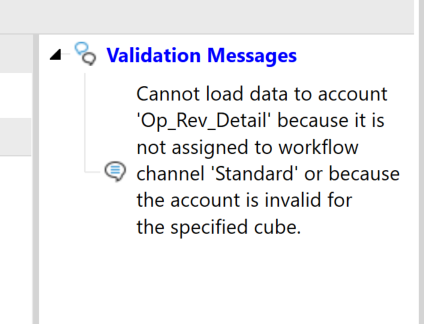
Hi, I can’t get my data import to work with vertical extensibility, and I’d like to understand how this situation is supposed to be handled. In short, the import validation fails on accounts that a...
 3 months ago
I got it now. Thanks a lot for your comments here. I was missing something.
Workflow Profiles in given "Cube Root Workflow Profile" can be set to different cubes when the Workflow Profile is created. The apps I've worked on in the past had the default cube be the same as the cube root's workflow profile's cube.
Montreux
3 months agoContributor
Thanks for the reply! I understand the reason the import needs the WF cube; it needs to know its dimensions for mapping.
However, vertical extensibility (vertically extended) entities can no longer have their cubes referenced in the parent cube when Is Top Level Cube For Workflow is set to True. I get this message in the Cube References dialog when I try to select the ChildCube1 when it is a top level cube.
So, if I want to import, the child cube must be a top level. If I want vertical extensibility, the child cube is not top level. How do I reconcile these two requirements?
(I am assuming that to make vertical extensibility work correctly the child cube needs to be referenced in the top parent cube.)

rhankey
3 months agoContributor III
You might have some other settings not set correctly. We have no issues setting the extended base-level cubes to IsTopLevelCubeForWorkflow=False that automatically consolidate into the parent cube. Only the parent cube is set to True.
Related Content
- 2 years ago
- 2 years ago
- 2 years ago