The OneStream Community is temporarily frozen until June 29th due to the ongoing maintenance. Please read the blog post here to learn more.
Forum Discussion

Chadwin
1 year agoNew Contributor
Input string was not in a correct format - V8 upgrade (Marketplace Solutions)
Hi Team,
As part of V8 upgrade, I have uninstalled UI. and then loaded SV102 zip file for capital planning. But receive the following message. Any one experienced this and resolved?
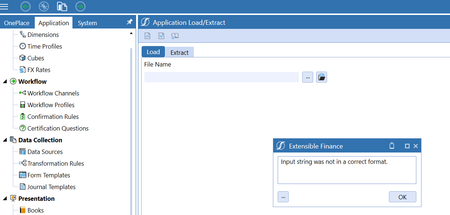
 1 year ago
SV102 loaded successfully, however error occurred again when accessing workflow step. Found that there was an issue on dashboard components. Ran each dashboard item to identify which had been causing the error.
Chadwin
1 year agoNew Contributor
SV102 loaded successfully, however error occurred again when accessing workflow step. Found that there was an issue on dashboard components. Ran each dashboard item to identify which had been causing the error.

cbarbieri
9 months agoNew Contributor
I see this is marked as solution, but I do not see what the solution was. This is still an issue in V9.01 with DSM PV8.4.0 SV100. This identical error message The input string '' was not in a correct format can be reproduced by selecting a frequency and trying to save it.
 mlemoine13 months ago
OneStream Employee
Hello, for this error inside of DSM, this can be fixed by going into the DSM_SolutionHelper business rule, searching for 'MonthsOptions_DSMT', and changing the uppercase 'M' to a lowercase 'm'. Cycle through them to make sure they are all now read 'monthsOptions_DSMT', save, and re-compile. It is a parameter that somehow changed.
Related Content
- 9 months ago