The OneStream Community is temporarily frozen until June 29th due to the ongoing maintenance. Please read the blog post here to learn more.
Forum Discussion

Jones
2 years agoContributor
Remove cleared Workflow data from Cube
Hello, I was reading below thread and wanted to try that out. Unfortunately that didn't work which might be due to OneStream version: https://community.onestreamsoftware.com/t5/Office-Hours/Data-wa...

CMBPM
2 years agoNew Contributor II
Hi JonesHedlund,
I replied to a post similar to this. The above can be used and another workaround is to essentially load nothing to the cube by retransforming without the load and retransform and continuing through to the load to cube.
-Colin

Jones
2 years agoContributor
Hey, thanks for Sharing,
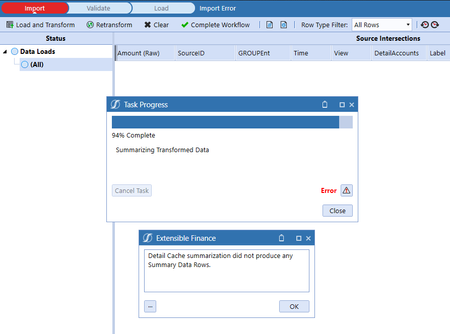
Well I tried the retransform part (after setting optinal data load to True). But it gives be below message on version 7.1.3.
I also tried below option since I never tried it before, but the cube data remains but workflow load step gets cleared.
Data Management - Clear data for the particular Data Unit however works fine. But I was wondering if there was a way of doing it directly from workflow since it would be really smooth.
- CMBPM2 years agoNew Contributor II
When you are doing the "Retransform", is the imported file present? When we want to load nothing, we do the "Clear All 'Import' Data from Cube" or the "X Clear" button so the Stage is empty. Then we hit "Retransform".
1. Clear Import, 2. Retransform, 3. Validate, 4. Load to Cube.
I have seen a case with this error you are seeing where the Data had come through into import but all rows were bypassed in some capacity so it was not able to produce any Summary Data Rows.
Related Content
- 1 year ago
- 7 months ago
- 2 years ago