
zwcope
1 year agoNew Contributor
Transformation rules - character error (Quickbooks)
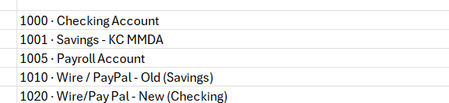
Trying to write transformation rules for a delimited TB file and Onestream does not recognize the "dot"/bullet point character. Makes it impossible to do a transformation profile load/extract to load...
 1 year ago
Hi - this can be done by attaching a parser business rule or complex expression to the dimension in the Data Source.
Go to the Account Dimension in your Data Source and change the logical operator to 'Complex Expression'
In the complex expression, paste the below script:
'This a prebuilt function in the API that removes characters not valid for an XF name property
	Return args.Value = StringHelper.RemoveInvalidNameCharacters(args.Value, False)
This script uses a prebuilt function that will remove unrecognized characters from the field value.

