The OneStream Community is temporarily frozen until June 29th due to the ongoing maintenance. Please read the blog post here to learn more.
Forum Discussion

Gidon_Albert
4 years agoContributor II
Workflow Name from Workflow Setting Property
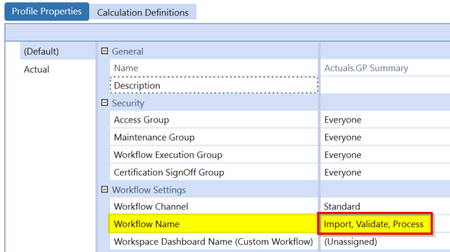
Does any one know if there is a BR command that can get the Workflow Name value from the Workflow Settings area of the Profile Properties (e.g. Import, Validate, Process) in a business rule?
...
 4 years ago
Hi Gidon,
I'm not aware of a supported or clean way to convert a workflow name key to a meaningful name. Perhaps someone else here may know a way?
How is the workflow to check being determined in your rule? If the workflow to check the property for is the user's POV workflow profile, you can use the following approach to retrieve the user's WorkflowInitInfo object and from there, you can retrieve a legible workflow name.
'get the user's POV WF profile info
Dim wfInfo As WorkflowInitInfo = BRApi.Workflow.General.GetUserWorkflowInitInfo(si)
'retrieve the WF name property from the WF
Dim wfName As String = wfInfo.GetSelectedWorkflowUnitInfo().WorkflowName
Regards,
Nick Kroppe

sameburn OneStream Employee
3 years agoOneStream EmployeeHi. Realise this is an old post but I stumbled across it in my search for the same answer.
In my use case I wanted to pass in the profilekey myself rather than deriving from si (so GetUserWorkflowInitInfo unfortunately not an option). However, we can achieve this via the GetWorkflowStatus BRApi (see snippet).
' Declare WF Variables
Dim wfProfile As String = "Houston.Import"
Dim wfScenario As String = "Actual"
Dim wfTime As String = "2023M1"

' Derive WorkflowUnitClusterPk
Dim wfClusterPK As WorkflowUnitClusterPk = BRApi.Workflow.General.GetWorkflowUnitClusterPk(si, wfProfile, wfScenario, wfTime)
' Derive WorkflowInfo
Dim wfinfo As WorkflowInfo = BRApi.Workflow.Status.GetWorkflowStatus(si, wfClusterPk, True)
' Get WorkflowName e.g. Import, Validate, Load
Dim wfName As String = wfinfo.Name

' Log Result -> Throw Error
Throw New XFException(StringHelper.RemoveWhiteSpace(wfName))
This will return Import, Validate, Load, etc (depending on setup) as the returned objects property name
Cheers
Sam
 ckattookaran3 years agoValued Contributor
The only issue there is with the hardcoded values. I'm not sure whether it was you on the other thread where I commented to use the ProfileTable (use that if and only if there is an access issue that is preventing you from getting the parent member) to get the name/guid of the workflow and use that to create your pk.
Related Content
- 1 year ago
- 2 years ago
- 2 years ago
- 2 years ago