The OneStream Community is temporarily frozen until June 29th due to the ongoing maintenance. Please read the blog post here to learn more.
Forum Discussion

Gidon_Albert
4 years agoContributor II
Workflow Name from Workflow Setting Property
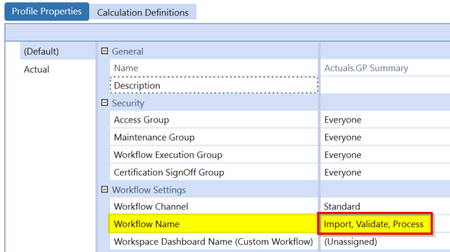
Does any one know if there is a BR command that can get the Workflow Name value from the Workflow Settings area of the Profile Properties (e.g. Import, Validate, Process) in a business rule?
...
 4 years ago
Hi Gidon,
I'm not aware of a supported or clean way to convert a workflow name key to a meaningful name. Perhaps someone else here may know a way?
How is the workflow to check being determined in your rule? If the workflow to check the property for is the user's POV workflow profile, you can use the following approach to retrieve the user's WorkflowInitInfo object and from there, you can retrieve a legible workflow name.
'get the user's POV WF profile info
Dim wfInfo As WorkflowInitInfo = BRApi.Workflow.General.GetUserWorkflowInitInfo(si)
'retrieve the WF name property from the WF
Dim wfName As String = wfInfo.GetSelectedWorkflowUnitInfo().WorkflowName
Regards,
Nick Kroppe

Oscar
4 years agoContributor
Thanks for the reference. In the examples the status is captured and presented at the time of running the command (ExecuteParseAndTransform) for example. What I am trying to do is retrieve the status in a different BR or step in a DM. The way I ended up accomplishing this was to save the needed run information into a txt file and retrieving the file at the end of the run and submitting in an email
Related Content
- 1 year ago
- 2 years ago
- 2 years ago
- 2 years ago