Entity-Specific Historical FX Rates for Acquisitions — A More Accurate IFRS Translation
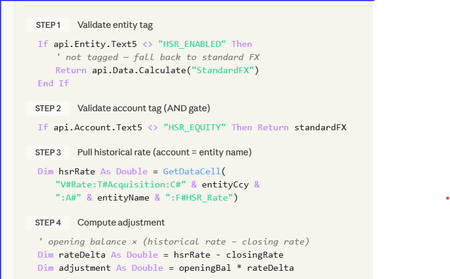
Stop Fighting Your Equity Translation — Let HSR Do the Heavy Lifting A 5-minute read for anyone who's ever stared at a CTA movement and whispered: “Where did that come from?” _____________________________________________________________________________ The consolidation problem we all know It’s day 4 of close. Consolidation runs clean. FX looks fine. Then someone opens the equity rollforward. “Why is acquired share capital moving again?” The entity was acquired years ago at a historical acquisition rate, but the system is retranslating equity at current closing FX every month. CTA absorbs the movement. Auditors ask questions. Finance posts manual journals. Everyone loses time. This is the classic Historical Spot Rate (HSR) challenge. The design principle The goal was simple: Freeze selected equity accounts at acquisition FX rates while keeping the standard OneStream Software translation engine intact. No new cube. No custom dimensions. No complicated override framework. Just: metadata tagging, controlled FX logic, and safe fallback behaviour. The HSR pattern Component Design Entity activation Entity.Text5 = "HSR_Entity" Equity tagging Account.Text15 = "HSR_Accounts" Historic rates Stored in dedicated HSR rate technical accounts Translation logic Finance Business Rule Audit trail Dedicated FX movement flow HSR = Historical Spot Rate. The rule only activates when BOTH: The entity is tagged, and The account is tagged. This creates a simple but effective control framework. The historic rate storage design should remain flexible: use technical accounts, use whatever Text property the project governance model agrees on, and confirm all translation account tagging requirements with the Group Reporting Manager before deployment. What does the rule actually do? Check if Entity is HSR_Entity Check if Account is HSR_Accounts Retrieve stored historic rate Calculate FX adjustment Post adjustment to MVMT_TRANS_FX If anything fails → revert to standard FX That last line is important. The design intentionally prioritises: consolidation stability, auditability, and safe fallback behaviour. If metadata is incomplete or a rate is missing, the application simply reverts to standard FX translation logic. No broken consolidations. No blocked close process. Why did this work well in practice? The biggest advantage was operational simplicity. Adding a newly acquired entity became: Load historic rate Apply metadata tags Run consolidation No code changes required. The approach also kept: CTA cleaner, Equity movements are more stable, And audit support is significantly easier. The real challenge: governance The code itself was straightforward. The harder part was operational discipline: Maintaining 1:1 entity-to-rate mapping Controlling metadata tagging Defining fallback expectations Building reconciliation reporting Testing CTA behaviour thoroughly In my experience, most FX translation problems are not technical problems. They are governance problems. Community question I’d be interested to hear how other certified OneStream Software architects and administrators are handling Historical Spot Rate scenarios. Particularly: Are you using metadata-driven activation? How are you storing historic rates? Have you handled HSR entirely through translation override logic? Any alternative designs that further reduce maintenance? How are you handling CTA transparency and audit reporting? Always interested in seeing cleaner or more efficient approaches from the community.11Views0likes0Comments
Next month Data not showing reversal of YTD
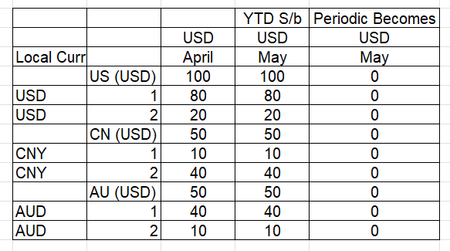
In consolidation system in the month after close example if we close April , May should show reversal of April. Please see below screen shots of how system is should show up and how it is showing. We tried clearing base data through data management. Any ideas would be helpful. Normally However the system is doing33Views0likes1CommentHybrid Scenario Issue: Copying Single Period Without Affecting Prior Months
Hello everyone, I’m encountering an issue with Hybrid Scenarios: I’m trying to copy data for a single period only. While I’ve successfully managed to copy Local data for that specific period by updating calc status, the results become inconsistent from Translated up to Top. To align the data from Translated through to Top in the target scenario, I currently need to run a Force Consolidate. However, doing so also brings in data from previous months, which is not desired. Has anyone faced a similar issue or found a way to restrict the consolidation to a single period without impacting prior periods? Thanks in advance,20Views0likes0CommentsConsolidate / Aggregate Averages
Good morning all, i've been asked to add some customer satisfaction values to our reports and its just a score out of 5, this works fine for base entities but I really need to parents to be an average of the base Entites that have a value. Is there a way t achieve this? appreciate your time. Tad49Views0likes1Comment
Issue Referencing Parent Entity in an Stored Account Member formula
Hi, We have a few accounts that contain stored formulas. These accounts contain formulas that reference another Account and Parent entity and it stores the result at a Base Entity. Below formula is for an account that has a formula pass 4. We are storing the result in "BaseEntity" and calculate Account1 by looking at OPEX at a Parent Entity. Obviously, since it is referencing a Parent Entity we have to run our consolidations twice in order to get the result. Is there a way to sum up the Base entities of Parent1 and reference that value in a formula or is there a way to run a consolidation within the formula for just that Parent Entity? In other CPM/EPM products I've worked with in the past you can right rules where you run an aggregation on the Entity and then run your calculation. In OneStream I cannot seem to find a way to do this. If api.Pov.Entity.Name = "BaseEntity" Then api.Data.ClearCalculatedData("A#Account1",True,False,False,True) api.Data.Calculate("A#Account1 = A#OPEX:E#Parent1:C#USD",True) End If Any help or assistance would be appreciated. Thanks John19Views0likes0Commentspossibility of UD1 parent-member consolidation by time
Dears, I need move one base member under another parent in UD1 dimensions, the problem is that member should be consolidated till specific time period and then should be consolidated under another parent. There is no option like "percent consolidation" with time frame on UD1 dimensions. Could anyone have any solution for described problem? Before: U1#A(parent) U1#A001(base) consolidated till proper month in 2026 U1#A002(base) After: U1#B(parent) U1#A001(base) consolidated after proper month in 2026 U1#B001(base)13Views0likes0CommentsSame Scenario Across Two Cubes vs Separate Scenarios — Pros & Cons?
Hello everyone, I’m looking for feedback on the pros and cons of using a single Actual scenario across two cubes (e.g., Consolidation and FP&A) versus defining separate scenarios for each cube. For example: Option 1 (shared): Consolidation Cube : Actual (Scenario Type = Actual) FP&A Cube : Actual (Scenario Type = Actual) Option 2 (separate): Consolidation Cube : Actual (Scenario Type = Actual) FP&A Cube : Monthly (Scenario Type = Control) From your experience, how do these approaches compare in terms of data governance, maintenance, performance, flexibility for planning/reporting, and potential risks (e.g., unintended impacts between cubes)? Any best practices or lessons learned would be greatly appreciated. Thanks in advance!32Views0likes0Comments
Data retention and deletion
As shocking as it may seem, someone has decided that we actually should delete data from OneStream. In this case, we've been instructed to retain a maximum of five years of data. Everything older than that must be expunged. Manual, painful, detailed steps aside: is there a good way to clear all old data that I just have never learned about because I have never actually worked with an org who was willing to let go of even one byte of information? I can manually delete the cube data with enough work (clear rules, consols, the odd custom rule or update to a member formula.) I can delete stage source data with even less work, though its still a bit tedious to click through a bunch of workflows. I haven't yet looked into how to delete stage target data; I'm hoping to find an easy solution but I'm also hoping someone will just tell me so I don't have to learn the hard way. What other data have I not even thought of yet? How do I get rid of it? Going forward, after we finish our year-end close, I suspect the next step for we admins will be to clear the oldest year. Ultimately, I'll have to write this into a guide that those who come after can follow but there's still lot I don't know that I don't know.Solved147Views0likes7Comments
Upgrade from 9.1 to 9.2
Hi, I would like to know if any major changes need to be carried over from 9.1 to 9.2 version upgrade. As we had some changes performed when we moved from 8.5.1 version to 9.1.0: Winscp to SSH.net Marketplace solutions to be upgraded to latest versions also Navigation center replaced applications reports, security audit reports. so, we had to remove the existing AR, SAR solutions. We had .vb in the extension wherever the xfbr has been referenced that extensions were no longer supported in 9 version. Thanks in Advance!165Views0likes1Comment