Cube View
818 Topics
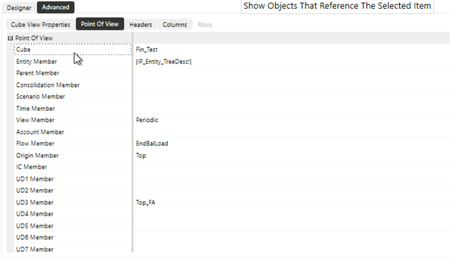
The report displays data for the developer but remains blank for other users.
Issue Description: The report displays data correctly for the user who developed it. However, when accessed by other users, the report appears blank and does not return any data. The following validations have been performed: The affected user has Administrator security access. Access to all dimensions used in the report, including the Cube View report, has been granted to Everyone. Relevant data is available for FY2027. Despite the above validations, the report continues to display data only for the developer and remains blank for other users. Further investigation is required to identify the root cause. Attached the screenshots for reference. Kindly suggest a workaround. Thanks!48Views0likes2Comments
Adding comments in cube view in front of calculated row
I’m working on a Cube View where one of the rows is a calculated row (using CVR / GetDataCell to derive the value from other rows). The users want to be able to enter comments directly in the Cube View in a column that appears “in front of” (or next to) this calculated row. Has anyone implemented comments or text entry against a calculated row like this? Specifically, I’m trying to understand: Whether it’s possible to add comments to a CVR-based calculated row (where the numeric data is not stored, only calculated at runtime). If not directly, what design patterns are recommended? Any examples of Cube View layout or member/filter tricks that let you show a calculated row and a comment entry cell side by side for that row. Environment is OneStream version 8.5.3, and this is a standard Cube View used for reporting (not a custom dashboard). Thanks in advance for any ideas or examples.50Views0likes1Comment
Excel Addin - Calculate
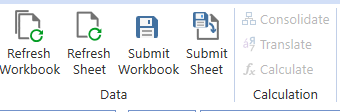
Hi, I am using OneStream version 8.2 and the Excel Add-In with a workbook that contains XFGetCell formulas. The workbook retrieves data successfully, and Refresh Workbook works as expected. However, the Calculate, Translate, and Consolidate buttons in the OneStream ribbon are disabled (grayed out). I am logged in successfully and can retrieve data through XFGetCell formulas, but I cannot perform any processing actions from Excel. Could anyone help me understand: What conditions must be met in OneStream 8.2 for the Calculate, Translate, and Consolidate buttons to become enabled? Is there any way to trigger Calculate, Translate, or Consolidate from Excel when working with XFGetCell-based templates? Thank you!56Views0likes1Comment
Updated Golfstream app?
Hi, is there a way to download an updated GolfStream version? I like to use it to reference different formulas, dashboards, features etc. but things break every time we upgrade our version....Rather than filing a ticket and modifying rules manually behind the scenes, I think it would be helpful to have an updated one issued by OneStream. I reviewed this forum and checked the Solution Exchange to no avail. Sometimes I just need help "getting started" with an idea that I've seen in a demo or solution and using Golfstream is a solid reference.51Views1like0Comments
How to Export a Dashboard
Hi Team, Generally we can export the cube view to an Excel. But when we attached the Cube view to the Dashboard through cube view component. at the time we wont find the export option. Can you please advise us. how export a dashboard(Cube view attached to dashboard).52Views0likes1Comment
BI Blend: Values too high
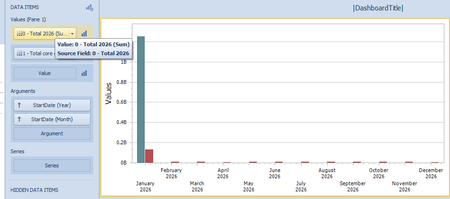
I have a bi blend based on cube view md. I have an issue with the Year total. The value is exaggerated as I have millions and not billions and because of this the height bars of the months is short. Does anyone have a clue on how to have the correct values? Thanks.78Views0likes0Comments
Read only option for cube views
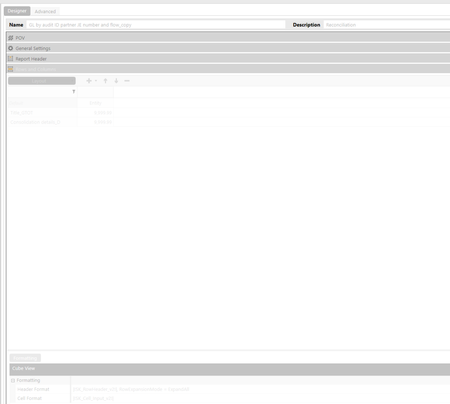
Hi , We have DEV and PROD environment and we want users to have read-only option to cube views in PROD environment. If we restrict the cube view group maintenance, users could execute the cube view but not see how it defined. All options are greyed out like shown in below picture. Is it possible to have Read-only option for cube view in production?55Views0likes2Comments
MergeAndCenterColumnHeaders in Cube Views
Hi, Anyone on Version 8 who's actually tried to use this 'enhancement' feature in Cube Views? We requested this on Ideastream a long time ago with a lot of support. I can see this command is now available in the header format dialog; however, it would appear that the only thing it does is change the header from left justified to center view. There does not seem to be a way to actually 'merge' column headers, despite the fact that it's called "MergeAndCenter". Even the system documentation appears to confirm this behavior. Someone please tell me I'm missing something here and it actually is possible to merge column headers, because we really really wanted this feature. Thanks855Views2likes11Comments