The OneStream Community is temporarily frozen until June 29th due to the ongoing maintenance. Please read the blog post here to learn more.
Cubes
129 TopicsCalculate if No Data
Have you ever wondered how the Calculate if No Data setting works? (I did, and Keith Berry helped me out) “Calculate if No Data = False” prevents the execution of rules on “OK,NA” (no data) entity. However, the Calc Status gets changed from “OK,NA” to “OK”, and it impacts the parent (“CN”). The “False” option is to avoid populating unused entities with rules. Calculate on “OK,NA” Force Calculate on “OK,NA” Calculate if No Data = True No rule execution No change in Calc Status Rule is run Calc Status changes to “OK” Parent becomes “CN” Calculate if No Data = False No rule execution No change in Calc Status No rule execution Calc Status changes to “OK” Parent becomes “CN”2.5KViews3likes3CommentsHo to extract a hierarchy for any dimension in Level format in OneStream?
Originally posted by Vignesh Mohan Hi, How can we extract the hierarchy of any dimension in an excel in a Level based format starting from top most level to the bottom most level for every base member ? Basically I do not want a Parent-Child format extract. Please find the attachments for the sample screen shot.2.6KViews2likes4CommentsUsing Variance Explanations and UD8 (Dynamic calc periods) together
Originally posted by Felipe Alcorta Hello: We'd like to incorporate variance explanations into our cube views. If the cube view shows one periodic comparison (e.g. Jun YTD CY vs June YTD PY), we have a corresponding dynamic calc that calculates the variance and we can use the (out of the box) variance explanation from the View dimension in order to have comment/explanation functionality. However, if we have multiple comparison period in the same column template/cube view, we are unable to. If we take the same approach as one periodic comparison, the same comment would appear in both comparison columns since there's nothing to distinguish which periodic comparisons are being explained against. We tried using a placeholder UD8 elements (no formulas) in addition to the variance explanation from View dimension but OneStream says it's an invalid cell. Advice?1.4KViews1like0Comments
Write Data to Dynamic Dimensions
I've been going through some training material on DCS for a use case that requires frequent changes in a dimension (UD3 - SKU). Because of this, I'm considering dynamic dimensions where the SKU can be written and generated via code. Unfortunately, I haven't found anything that supports writing data from a cube view. I've only found material that says the "Dynamic Cube" needs to have the share and edit feature turned on. Question - Is it even possible to create a cube, use a dynamic dimension as one of its dimensions, write allocation calcs to allocate data to SKU level and be able to modify that data using cube views? If not, what is the best way to handle this use case without having to create another non-dynamic SKU dimension.Solved185Views1like4CommentsCube | Data Access | Data Cell Access Security/Slice Security by U1#Geography
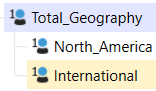
https://documentation.onestream.com/1375907/Content/Design%20and%20Reference/Cube/Data%20Access.html? Please share your expertise to set up a Cube's Data Cell Access Security / Slice Security to limit data read access as outlined below: Dimension: U1# - Geography Total_Geography = Child 1 + Child 2 = Total / Top North_America = Child 1 / NA International = Child 2 / Int'l Slice Security: Access Level - Read Data by Geography - in a CV and a QV Total_Geo_Data = Read Total data | Read NA data and Read Intl data NA_Data = Read NA data | no data access = International and Total Intl_Data = Read Int'l data | no data access = North America and Total TY for your practical advice - SMEs.Solved447Views1like3Comments
Enhancement Request - Sharing Entities from "Top" Cube
I've had requests from our finance team about sharing entities from our "Top" cube into another. Our application is in a mature phase now and many of the entities from our top cube will be moving into cubes of their own. Currently, we only have two options: Option1: Completely clear the entity, delete, and the create in the new cube and reload the data. Option2: Rename the entity i.e "EntityA_Old" and create a new entity in the new cube with the old name "EntityA" It would be great if there were a better option344Views1like0Comments
Cube Properties Best Practices!
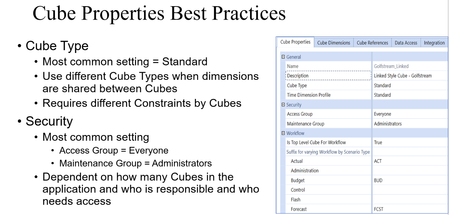
Given a situation, determine the correct properties for the Cube. Certification Exam. Workflow The most common setting Is Top Level Cube for Workflow (Main Cube) = True Project requirements dictate Suffixes for varying Workflow by Scenario Type Assigning Suffix by Scenario Type allows the same Entity to be assigned to different Workflows in different Workflow Cube Root by Scenario Type The best practice is to configure a suffix early on for common Scenario Types regardless of whether they get used. NOTE: These settings cannot be updated once data is loaded to a specific Scenario Type. Leaving blank is defining the suffix as well. Calculation Consolidation and Translation Algorithm Type Most common setting = Standard Settings based on design decisions on how consolidation and translation to be customized. Recommendation – Only change from Standard to Custom on sporadic cases. Elimination and Translation logic should be done either on the Member using O#Elimination or C#Elimination or using Translate as part of the Finance Business Rule and assigning it to Cube. Use Standard Using Business Rules for FX Rates for Translation Algorithm Type in the above case. Calculation Properties: Business Rules Cube Properties: FX Rates Cube Properties: Set Default Currency FX Rates for the Cube. The most common settings for the Cube are shown in the screenshot. Default Currency is dependent on the currency of the application. NOTE: Triangulation is dependent on default currency Best Practice – Control the FX Rates by Scenario. Deep dive of FX Rates discussed during setting Scenario settings. For more - OneStream Certified Professional (OCP) – Lead Architect Certification Prep Webinar in Navigator.Solved1.7KViews1like1Comment
Cube Limit
Hi All, I have a bit of an extreme question here. Is there any limit, whether system or logically, that there are too many cubes in an application? My example (which I have simplified here for illustrative purposes) relates to UD1 for Cost Centers where we have 150 entities all having unique and different cost centers. Since they each have 20 unique Cost Centers, that's potentially 3,000 Cost Centers in one dimension which feels big and very sparse. Thinking through options for how to approach, one option we are weighing is to add a separate cube for each entity and assign a separate UD1 dimension to each cube / entity so they would only have 20 Cost Centers to contend with. As it rolls up the entity structure, it would consolidate to a Summary cube that has one member called 'Total Cost Center' thereby shrinking the data unit in the top cube. Has anyone dealt with these high numbers of cubes before? My gut tells me be that this could be troublesome but sometimes it seems like others are more liberal in their cube assignments. Curious your thoughts? Also, if in another example, there were 2,000 entities rather than 150, would that change your opinion? Is there a line here? Thx, MikeSolved4.8KViews1like15Comments
Cube View - Split Delimited Stored Item Text into Separate Columns
Hello - I have a cube view that currently has two columns. The first is just base members of an account hierarchy, and the second is a dynamic calc UD8 that retrieves the text 5 value for each account stored by scenario type. The UD8 is working and pulling the correct text 5 values, however some but not all of the stored item text is delimited by semicolons. How can I split this text by semicolon into separate columns in the cube view?1.8KViews1like2Comments