Import XML to create objects
Hi All, I have a process that exports a dashboard and all of its components to XML. It then reads through the XML and creates new objects. The process works when I import the XML by hand. I was wondering if there is a way to have the code: 1) delete objects if they exist 2) import the XML to create the new objects. Thank you, ScottSolved2.5KViews0likes9Comments
Annotation Matrix load
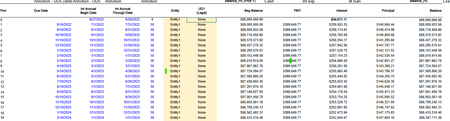
Hi, we would like to know if it is possible to load multiple columns of amounts and annotations as a matrix load ( we have 3 date columns and 3 columns for amounts and it would be an account matrix as each column would go to a different account). We are able to load a matrix load where one column is an annotation and there are multiple amount columns, but when there are multiple annotation and amount columns, we have not been successful. See screenshot. The date columns would be loaded as annotations, the Begbal, Pmt, Interest columns to amount. Each column would be going to a different account. Please advise, thank you74Views0likes2Comments
Include Site Certificate when using HTTPClient
I'm trying to write a BR that returns data using HTTPClient. I've tested out the api.open-meteo.com example and can successfully pull data from this site. The site that I am trying to query requires a site certificate for authentication and I'm not sure how to tell my BR to use the site certificate that is already installed on the SIC server. On the SIC server, I can manually run the query to the source site via a web browser which prompts me to select the appropriate certificate. Has anyone been able to include a site certificate to a HTTPClient request? Thanks, Cosimo14Views0likes0Comments
Monthly Data from D365 into OneStream
Is there an interface from Dynamics 365 into OneStream? I have seen some comments mention direct connection with D365 using oData API. We have several business units across the world that will need to push month end data from D365. Is there a way they can just push the data from their end or would it have to come from OneStream to get the data?75Views0likes3CommentsWhy 2+ Import of a Matrix Flat File of One Workflow Profile to Load Certain Months into a Data Cube?
For the first Import of a Workflow Profile, data in certain months in a "Matrix flat file" failed to be loaded into a Data Cube. For the second+ Import of that Workflow Profile, data in those months in that "Matrix flat file" could be loaded into a Data Cube. - In summary, data in certain months in a "Matrix flat file" must be Imported > 1 time of a Workflow Profile to be loaded into a Data Cube. Please share the root causes for v9.2. Thank you, SMEs.Solved125Views0likes2CommentsUnable to Post Journals to Locked Entity Despite Central Journal Input Step
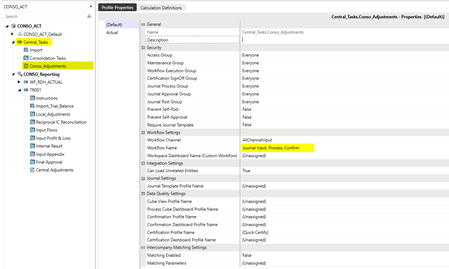
Hello Everyone, I’m encountering an issue in OneStream when trying to post a journal via central workflow to an entity whose workflow is locked. Normally, central journal input steps are designed to allow journal postings even when the entity’s workflow is locked. In my case, I have configured a central journal input step within the workflow profile of the entity, so I would expect journal entries to still be accepted despite the lock. However, when attempting to post the journal, I receive an error indicating that the entity is locked. Has anyone experienced a similar issue where central journal input steps do not bypass the workflow lock as expected? Are there specific configuration points or workflow setup details that could explain this behavior?Need to send data from OneStream to Snowflake using an existing SIC ODBC connection
Hello, What is the best way to send data from OneStream to Snowflake using an existing SIC ODBC connection? Currently I am using SIC ODBC connection to query data from Snowflake and now I would like to send data back to Snowflake.83Views0likes2Comments
File Explorer Incoming workflow folders missing in copied applications
This post is to provide information about File Explorer Incoming workflow folders. Based on what we've seen in our environments, when an application is copied, the new application does not contain the folder structure located at: \File Share\Applications\<Application Name>\Incoming\<Cube Root Name>_Cube\<Workflow Base Input Name>\<Workflow Import Name> We noticed these folders were missing in our last application copy when we were trying to copy files through SIC and drop them into the workflow import folders since our requirement was to drop them there for users to manually import when they choose (instead of automatically loading the files through batch import from batch harvest). To fix this issue we exported the Workflows and re-imported them back into the copied application. This triggered OneStream to create the cube root folders and workflow folders for the workflows that were imported. Hope this helps someone else who might be running into the same issue.1.7KViews4likes10Comments
Best practice for filtering vStageSourceAndTargetDataWithAttributes by Workflow
Hi everyone, I am building a query using the vStageSourceAndTargetDataWithAttributes view and I want to ensure I am retrieving the latest figures for a specific Entity and Time period. I have a few questions regarding the best way to filter this: Filtering by Wfk: I know that hardcoding a GUID for the Wfk (Workflow Key) is risky because it can change between environments or if a profile is reset. What is the recommended way to dynamically filter for a specific Workflow Profile? Should I be joining on the WorkflowProfileHierarchy table/view to filter by ProfileName? Latest Figures: If multiple imports have occurred, does filtering by a specific Wfk automatically ensure I am seeing the "latest" iteration of the data, or is there a better field to use for partitioning/ranking the results? Any code snippets or best practices for making these stage queries robust would be highly appreciated.81Views0likes2Comments