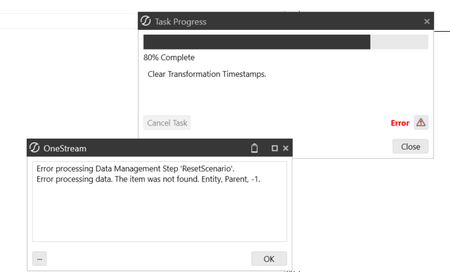
Reset Scenario Error: Error processing data. The item was not found. Entity, Parent, -1.
Hi, I have encountered an error when running reset scenario that says "Error processing data. The item was not found. Entity, Parent, -1." I understand that the possible cause of this issue is that there might be orphaned entity members. However, in the application I am working on there are no orphaned members. Could there be any other possible cause that I could look into? There is not much detail in the logs that I can find. Any suggestion/recommendation is appreciated :) Thanks!60Views0likes1Comment
Best Practice for Managing Outdated Members in Transformation Rules?
We have recently received feedback from several entities regarding outdated account members that still exist within our Transformation Rules. Before making any changes, I wanted to gather input on best practices for handling these scenarios. Specifically, I’m unsure whether it is appropriate to remove or delete these members, or if they should be retained and continue to be mapped for historical reporting purposes. If anyone has guidance or experience with managing outdated members in Transformation Rules, your insight would be greatly appreciated.84Views0likes3CommentsBest practice for filtering vStageSourceAndTargetDataWithAttributes by Workflow
Hi everyone, I am building a query using the vStageSourceAndTargetDataWithAttributes view and I want to ensure I am retrieving the latest figures for a specific Entity and Time period. I have a few questions regarding the best way to filter this: Filtering by Wfk: I know that hardcoding a GUID for the Wfk (Workflow Key) is risky because it can change between environments or if a profile is reset. What is the recommended way to dynamically filter for a specific Workflow Profile? Should I be joining on the WorkflowProfileHierarchy table/view to filter by ProfileName? Latest Figures: If multiple imports have occurred, does filtering by a specific Wfk automatically ensure I am seeing the "latest" iteration of the data, or is there a better field to use for partitioning/ranking the results? Any code snippets or best practices for making these stage queries robust would be highly appreciated.81Views0likes2Commentsloading from ERP
Hi Community :) We are currently in development with regard to loading sub-ledger data into OneStream, but the balance specifications are so granular that we currently have them split into about 10 distinct loads. Because of this setup, our end users are being forced to manually click "Load and Transform" 10+ times to get a complete sub-ledger balance loaded for the period. Obviously, this is tedious, creates a poor user experience, and introduces a lot of room for human error. We want to streamline this. What is best practice to do this?98Views0likes1Comment
Best Practice to Clear Stage Data Globally and Cube Data for Selected Entities
Hi Team, I’m looking for guidance on the best approach to clear data in OneStream. My requirement is twofold: Clear all data from the Stage area For a selected set of entities, clear both Stage and Cube data I’m particularly interested in understanding the most efficient and recommended way to handle this, while ensuring data integrity and minimizing any unintended impact. Specifically, I would appreciate insights on: Recommended methods to clear Stage data globally (e.g., via Data Management steps, Business Rules, or utilities) The best approach to selectively clear Cube data for specific entities Any considerations around workflow locks, data unit locking, or audit/history implications Performance best practices and recommended sequence of operations If anyone has implemented a similar requirement, I’d love to hear your approach or any lessons learned. Thanks in advance for your help!189Views1like2Comments
What could be a reason for a Save button in a workflow to be triggered several times after save?
For some reason, the workflow save event is being called several times. I have this configured right (I believe): Dim returnValue As Object = args.DefaultReturnValue args.UseReturnValueFromBusinessRule = False args.Cancel = False Case Is = BREventOperationType.Workflow.UpdateWorkflowStatus Dim sWorkflowImpactMessage As String = args.Inputs(3) 'Example: 'Reason = Save Data Cells 'Data Entry Type = CubeView 'Cube View Or Filename = NameOfCube 'Data Entry Audit ID = 0d6e8f60-de0f-4ab3-ba69-2f28a0d2 'Task Activity ID = 00000000-0000-0000-0000-000000000000 If ( sWorkflowImpactMessage.Contains("Reason = Save Data Cells") ) Then If (args.IsBeforeEvent = False) And (sDataEntryType = "CubeView") Then Here is my code - If I print a message, I see it several times. Thanks Raf173Views0likes2Commentsloading sub-ledger data into OneStream
Hi Community :) We are currently in development with regard to loading sub-ledger data into OneStream, but the balance specifications are so granular that we currently have them split into about 10 distinct loads. Because of this setup, our end users are being forced to manually click "Load and Transform" 10+ times to get a complete sub-ledger balance loaded for the period. Obviously, this is tedious, creates a poor user experience, and introduces a lot of room for human error. We want to streamline this. What is best practice to do this?115Views0likes2CommentsSequence not performing appropriately in WF
Hello, I have Product and Customer allocations that I would like to be ran on the process step of the Workflow. The weird challenge that I am running into is that when I run each step of the sequence on its own, the allocations are executing as expected. When I run all of the allocations with one sequence/in the Workflow, my allocations are producing errant results. (E.g. my allocated-in amount in is only a small fraction of my allocated-out amount.) Is there a property I am missing on a sequence or workflow that may cause problems if not handled appropriately? I am calling the sequence with a No Calculate in the WF, which executes a handful of Finance BR Calcs.Solved
Scheduled tasks not running
Hi, I have 12 separate schedule tasks that is set to run monthly on calendar days 1-15. It runs every 2 hours starting from 12AM. (Next is 2AM, 4AM, and so on) I am encountering inconsistent issues with 6PM and 12AM where it does not kick off at all on random days. I've checked the configurations and can confirm it is set up right. Any idea what's causing the inconsistent failure to run? I'm in central time if that helps.96Views0likes2CommentsHow to "Import" "in parallel" via a "OneStream Connector" to a "Data Warehouse"?
Please share your practical advice to help us meet the new Integration requirements. - I couldn't find a OneStream KB/post nor a good result from free Gemini. - We're using SAAS on v9.0 to move to v10 upon its upcoming release. Thank you folks for sharing your expertise.114Views1like2Comments