Entity-Specific Historical FX Rates for Acquisitions — A More Accurate IFRS Translation
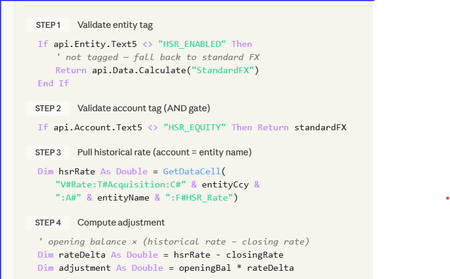
Stop Fighting Your Equity Translation — Let HSR Do the Heavy Lifting A 5-minute read for anyone who's ever stared at a CTA movement and whispered: “Where did that come from?” _____________________________________________________________________________ The consolidation problem we all know It’s day 4 of close. Consolidation runs clean. FX looks fine. Then someone opens the equity rollforward. “Why is acquired share capital moving again?” The entity was acquired years ago at a historical acquisition rate, but the system is retranslating equity at current closing FX every month. CTA absorbs the movement. Auditors ask questions. Finance posts manual journals. Everyone loses time. This is the classic Historical Spot Rate (HSR) challenge. The design principle The goal was simple: Freeze selected equity accounts at acquisition FX rates while keeping the standard OneStream Software translation engine intact. No new cube. No custom dimensions. No complicated override framework. Just: metadata tagging, controlled FX logic, and safe fallback behaviour. The HSR pattern Component Design Entity activation Entity.Text5 = "HSR_Entity" Equity tagging Account.Text15 = "HSR_Accounts" Historic rates Stored in dedicated HSR rate technical accounts Translation logic Finance Business Rule Audit trail Dedicated FX movement flow HSR = Historical Spot Rate. The rule only activates when BOTH: The entity is tagged, and The account is tagged. This creates a simple but effective control framework. The historic rate storage design should remain flexible: use technical accounts, use whatever Text property the project governance model agrees on, and confirm all translation account tagging requirements with the Group Reporting Manager before deployment. What does the rule actually do? Check if Entity is HSR_Entity Check if Account is HSR_Accounts Retrieve stored historic rate Calculate FX adjustment Post adjustment to MVMT_TRANS_FX If anything fails → revert to standard FX That last line is important. The design intentionally prioritises: consolidation stability, auditability, and safe fallback behaviour. If metadata is incomplete or a rate is missing, the application simply reverts to standard FX translation logic. No broken consolidations. No blocked close process. Why did this work well in practice? The biggest advantage was operational simplicity. Adding a newly acquired entity became: Load historic rate Apply metadata tags Run consolidation No code changes required. The approach also kept: CTA cleaner, Equity movements are more stable, And audit support is significantly easier. The real challenge: governance The code itself was straightforward. The harder part was operational discipline: Maintaining 1:1 entity-to-rate mapping Controlling metadata tagging Defining fallback expectations Building reconciliation reporting Testing CTA behaviour thoroughly In my experience, most FX translation problems are not technical problems. They are governance problems. Community question I’d be interested to hear how other certified OneStream Software architects and administrators are handling Historical Spot Rate scenarios. Particularly: Are you using metadata-driven activation? How are you storing historic rates? Have you handled HSR entirely through translation override logic? Any alternative designs that further reduce maintenance? How are you handling CTA transparency and audit reporting? Always interested in seeing cleaner or more efficient approaches from the community.11Views0likes0Comments
FX Data Feed - Actual & RE-BP Rates - Automate from Onestream to another source like GCP
Hi, we are looking for guidance and experience on automating the process of exporting fx rate data from OneStream to Google Cloud Platform (GCP). What is the best approach to automate this data flow from OneStream to GCP? Are there recommended methods (API, connectors, data pipelines) for this integration? Any best practices or examples for handling FX data in this setup? Thank you!Solved50Views0likes1Comment
FX Rates by Subsidiary
Hello ONECommunity, We use NetSuite as our ERP system, and we have different FX rates by subsidiaries that apply to the transactions that occur within those subsidiaries. This means that for AverageRate we can have two EUR->USD FX rates within NetSuite. One FX rate for each of the two subsidiaries. When we pull those transactions for our income statement accounts into OneStream to load our YTD Actual scenario, we are seeing some FX variances because OneStream can only apply one EUR->USD FX rate that is stored within the cube's applied FX rate type. How have others solved this issue? Is there a way to apply multiple EUR->USD FX rates within OneStream we are not seeing or is this whole process uncommon and we need some changes to our ERP? Thanks!Solved73Views0likes2CommentsHow to get FX rate from different source?
I have the request to automate FX rates upload. Rates are stored in DWH (Data warehouse) and that would be easy if I could simply connect there. Unfortunately DWH team doesn't allow it, instead of it they can push their FX rates into my database. Any idea how can I get them such access? Thanks!Solved534Views0likes13Commentspossible to post directly to "translated" without being overwritten? (for USD journal in EUR entity)
hi all, I just want to confirm the tool's approach: If I have a foreign entity (defined as EUR), can I post a journal entry directly to USD (Translated), and it won't be overwritten by the built-in currency translation? (in other words, it won't just overwrite translated with whatever is in local?) Or is there something else I have to do to accomplish a USD journal in a non-USD entity?817Views0likes3CommentsActual at other FX rate (PY/Bud/PP) - Currency Neutral - How to view Fcst Scenario at other rate
Two part question. Comparing Actuals as other Rates to remove currency flux We want to take our Actuals and view at PYE, PYP & budget FX rates to take out flux in currency. Is there a feature (outside of creating BR's or Alt Rate types) to do this. We currently have built 3 scenario for the above rates and it works as expected for base level members. Where we run into issues is with converting to Reporting currency at parent members. Ex is converting our EMEA entity (currency - EUR) to USD. The BR seems to store the USD value at the base entity but is converting from EUR to USD at parent level using OS logic (ie current defined rate for Actual scenario). It is not consolidating up the USD value but converting from EUR at parent member. This BR was created almost 6 years ago when we implemented so hoping there is something out-of-the-box now that will do this. I am exploring creating 3 new Rate Types: PY Budget, PYE Actual & PYP Actual. I would copy all the PY rates into these 3 new rate types and then create 3 Actual scenarios, each using these new rates. The big issue is having to copy all the data over from Actuals and then reconsolidating. Hoping there is a better way. Fcst Currency Neutral - Having Fcst at the Budgeted rate We are US company with large % of our business from Europe and the flux in EUR to USD is distorting our review of how we are doing. Looking for a way to see our Fcst how we expect (current process) and at Budget rate. I could copy to new scenario that is set to Budget Rate but we have 12 Fcst scenarios and that would take up alot of resources to copy and consolidate as we would need to do this many times during Fcst process (ie it would not be something we only did once the Fcst was closed but during the process) Would this be a UD8 member and if so, how would it handle Base and Parent level members. Looking for best practice advice on how to handle these two issues.131Views0likes1CommentAttribute Members on Entity Dimension Do Not Translate ?
I'm using attribute members, unfortunately on the entity dimension, so the associated data is stored and not dynamically calculated on Parent Entities. These attributes members do not translate to foreign currencies during the consolidation process ! I'm using a 'Custom Translation', and when I execute the method 'Api.Data.Calculate()' or 'Api.Data.CalculateForTranslation()' the attribute cells do not translate. The only way I was able to actually convert them is by using Data Buffers and forcing the conversion. Is there a reason why ADC methods do not translate attributes ? Is there a hidden property to activate in order to take these members into account ? Should I use 'Api.Data.Translate()' instead of ADC ? Thanks224Views0likes2Comments
currency names of the FX rates or the connection between the FX rates
Hi Everyone. I am running an SQL query, but I am now encountering an issue with currency conversions. The only thing my table contains is the column with the currency name, but it is not very helpful because the FX rates table only contains the ID. I would like to know where I can find the FX rate IDs and names in the query, or if there is an intermediary table to accomplish this. The tables I am currently using are: XFW_PLP_Register and XFW_PLP_Plan.Solved892Views0likes5Comments