About Admin
Whether you are a novice or seasoned administrator, this book examines key concepts to help you understand and manage the financial and data processes of your OneStream application. Written for administrators, this book is filled with technical and functional contexts – whether syntax-related to business rules or general accounting concepts – and dives into practical examples and use cases that provide guidance and insights into commonly encountered themes. By the end of this book, you will have a deep understanding and appreciation of the capabilities that the OneStream platform offers, and have the tools needed to tackle the wide variety of administrative actions that may surface. In this book, we will cover: Components within OneStream, such as application properties, metadata, and workflow Data troubleshooting for missing or off data, whether that is related to integration setup, workflow setup, calculation adjustments in business rules, or more. Translations involving cube and metadata settings, plus the loading and viewing of FX rates. The security framework, and all the nooks and crannies that can be secured within OneStream. Constraining and locking data through systems-level and process-level controls. Considerations – as companies mature – for the updating of new or existing business processes. To access the complete publication, you must purchase either the PDF or the physical copy of the book. Purchases can be made at onestreampress.com. Table of Contents Chapter 1: Introduction Chapter 2: Testing Chapter 3: Application Properties Chapter 4: Metadata Management Chapter 5: Translation Chapter 6: Work the Workflow Chapter 7: Data Troubleshooting Chapter 8: Import and Validation Errors Chapter 9: Constraining and Locking Data Chapter 10: Business Rules Chapter 11: Cube Views Chapter 12: Securing the Pieces Chapter 13: Compliance and Audit Chapter 14: Business as “Usual” Index158Views1like0Comments
Maximizing Cube Utilization in OneStream Applications
Cubes control how data is stored, calculated, translated and consolidated based on the Dimensions assigned to it. Cubes are flexible and can be designed for a specific purpose (HR or People Planning Cube, Budget/Sales/Cost Drivers Cube or even Tax Cube) or data type in a OneStream XF Application. Dimensional assignments can vary by Scenario Type. An application can have multiple Cubes that can share Dimensions and data Separate Cubes may be used to hold data outside of the main financial Cube.665Views1like0CommentsData Processing and Performance - A comprehensive guide of tables, and design
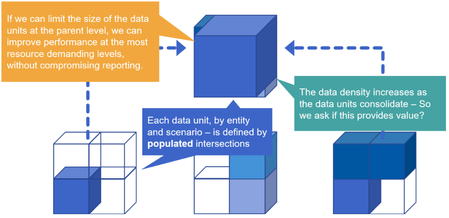
Overview To maintain well performing application, one must understand how the underlying database works and more importantly its limitations. Understanding how a system works, allows designers and administrators to create reliable, stable, and optimal performing applications. This white paper is intended to guide the design of those optimal data processing strategies for the OneStream platform. First, this document will provide a detailed look at the data structures used by the stage engine as well as those used by the in-memory financial analytic engine, providing a deep understanding of how the OneStream stage engine functions in relation to the in-memory financial analytic engine. The relationship between stage engine data structures and finance engine data structures will be discussed in detail. Understanding how data is stored and manipulated by these engines will help consultants build OneStream applications that are optimized for high-volume data processing. Second, the workflow engine configuration will be examined in detail throughout the document since it acts as the controller / orchestrated of most tasks in the system. The workflow engine is the primary tool used to configure data processing sequences and performance characteristics in an OneStream application. The are many different workflow structures and settings that specifically relate to data processing and these settings will be discussed in relation to the processing engine that they impact. Finally, this document will define best practices and logical data processing limits. This will include suggestions on how to create workflow structures and settings for specific data processing workloads. With respect to data defining processing limits, this document will help define practical / logical data processing limits in relation to hard/physical data processing limits and will provide a detailed explanation of the suggested logical limits. This is an important topic because in many situations the physical data processing limit will accept/tolerate that amount of data that is being processed, but the same data may be able to be processed in a much more efficient manner by adhering to logical limits and building the appropriate workflow structures to partition data. These concepts are particularly important because they enable efficient storage, potential parallel processing and high-performance reporting/consumption when properly implemented. Conclusion Large Data Units can create problems for loading, calculating, consolidating, and reporting data. This really is a limitation of what the hardware and networks can support. Your design needs to consider this. This paper provides some options to relieve some of the pressure points that could appear. NOTE: some tables mentioned in the paper have changed in version 9+. See this note for further details.18KViews24likes0CommentsThe Magic and Math of C#Top
I hear that you’ve bought the OneStream Administrator Handbook – well, well, congratulations on taking the steps that will (hopefully) make your life as an Administrator easier! The book is brimming with great examples and use cases on topics that the Administrator will likely encounter, but here’s something a little extra – a more detailed break-down on how C#Top works between the base entities to their parents! This comes in handy when an end user new to OneStream, comes to you and says something along the lines of, “Hey, the sum of the base entities doesn’t equal to the parent entity, what gives?”1.7KViews6likes1Comment
Historical Restatement, No Code Required!
In today’s modern business world, a company’s organization structure can move more frequently than anticipated through changes like acquisitions, divestitures and mergers. The organization’s structure in OneStream is often represented in the Entity dimension. This blog discusses a scenario where an entity changed owners and how historical data was restated.699Views0likes0Comments
How's your Week?
When you are designing an application, do you wonder whether or not you should be including weeks in your time dimension? This blog will look at the options available when you have a requirement for storing/reporting weekly data and answer some of the questions you should be asking yourself when deciding how to meet that requirement....1.3KViews4likes0CommentsUnlocking the Power of Attributes in OneStream: Balancing Potential with Performance
OneStream offers users the ability to activate Attributes for key dimensions such as Entities, Scenarios, Accounts, and User-Defined dimensions. The process to enable Attribute Members is relatively straightforward, found within the Settings -> Attribute Member section of the User-Defined dimensions. While Attributes hold the promise of expanding the Financial Model capabilities of OneStream, they also come with a caveat - the potential to impact system performance. In this blog post, we embark on a journey through the realm of Attributes in OneStream. We will delve into the opportunities they present for enriching your financial model and dive into the challenges that may arise, particularly concerning performance issues. By the end of this exploration, you'll have a comprehensive understanding of when and how to implement Attributes effectively, ensuring that your OneStream application strikes the right balance between functionality and performance.3.2KViews13likes2Comments