The OneStream Community is temporarily frozen until June 29th due to the ongoing maintenance. Please read the blog post here to learn more.
Parameters
174 Topics
Number of Reports Published
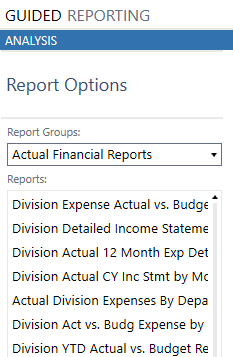
I am relatively new to OneStream and have recently taken responsibility for managing the platform within our organization. As I look for ways to improve the user experience, I feel our current reporting structure may be excessive. We currently have more than 90 reports available to users, including approximately 30 budget reports alone. The data is basically formatted differently in each report (ie Monthly, YTD, FullYear) I am curious how other organizations manage and govern the Reports function. How many reports do you typically make available to licensed users, and what best practices have you found for balancing user flexibility with report standardization and simplicity?42Views0likes2Comments
T-Doc for Account Reconciliations
Hello, our company recently adopted OneStream for our account reconciliation tool. Our current process is that the account reconciliations are tracked within excel. My current issue is that for one account, I am reconciling multiple entities within one excel document. I want to be able to integrate these T-docs within my excel file for easy upload to OneStream. Whenever I do this for one entity, it seems to work well. However, if I add multiple T-Docs, OneStream seems to only pull the first T-Doc within the file instead of looking at the unique identifiers to pull the correct T-Doc. Is there a solution to this? Thanks!16Views0likes0Comments
Buttons: Does not aling when using browser.
Hi If/when we are going to move to the browser solution, I would like to have my dashboard menu to be align to left. This is how it looks in the app: This is how it looks in browser. It is OK that icons are in colors, but I can't align the text to left. Component properties are the following (with no effect) Any suggestion on how to align it? Regards Ole40Views0likes1CommentBalance Sheet report: displaying two CubeViews in a two-column layout
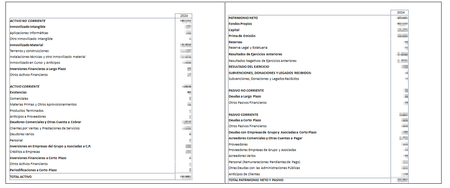
Hi everyone, I'm building a Balance Sheet report in the Text Editor. For various reasons, I have two separate CubeViews: one for Assets and another for Liabilities & Equity. I've placed both CubeViews inside a table within the Text Editor (one per cell, side by side), trying to display them in the classic balance sheet layout — Assets on the left, Liabilities & Equity on the right. However, I'm having trouble getting them to render correctly next to each other. Has anyone done this before? Is a two-cell table in the Text Editor the right approach, or is there a better/recommended way to place two CubeViews side by side in a single report? Any tips or examples would be greatly appreciated. Thanks!36Views0likes0CommentsReturning text from a BR# inside GetDataCell — possible?
I'm building a cube view column that shows combined annotations from descendants. I'm calling an Finance Cell Service BR from inside GetDataCell so I can pass dashboard params needed for the logic. GetDataCell(T#|CVTime|:BR#[BRName=..., FunctionName=CombinedComment, Flux_ID = {fluxID}]:U8#{ud8}):Name({ud8} Combined). I need to the UD8 POV member because that distinguishes what type of comment it is (CMvsPM, CQvsPQ, CMvsPYM, Ect...). The BR returns a String, but GetDataCell expects a numeric amount so the text doesn't render in the cell. Pointing the column at V#Annotation doesn't help either. Has anyone gotten BR-returned text to display in a GetDataCell with full POV/param context? Thanks, Ben94Views0likes1CommentButton Parameter Not Resolving in 8.4.4
Our two environments are currently on different OneStream versions. DEV is on 9.1.1 and PROD is 8.4.4. We have an upgrade scheduled to get them in sync soon. However, currently facing a parameter resolving and passing issue while trying to migrate some functionality from DEV to PROD. All setups are now equal between the two applications for the workspace that I moved over to PROD. However, I believe version 8.4.4 is having some trouble resolving parameters being passed to a button click that I have on the same dashboard. I have a button whose "Selection Changed Server Task" is set to "Execute Data Management Sequence" and "Selection Changed Server Task Arguments" is set to "{FilteredForecastRollforward_ButtonRan}{SelectedContracts=[|!param_SelectContracts!|]}". Within 9.1.1 DEV this data management sequence runs no problem an receives the value of "Contract1" upon logging. However, in 8.4.4 PROD this parameter is not resolving properly and comes as "|!SelectedContracts!|" in the error log even though the setups are identical. Upon checking the 9.1.1 release notes I noticed that there was a fixed issue number "PF7-9772" under "Dashboard Components" that states "Button Component: The Button dashboard component respects the Selection Changed Server Task value, ensuring that Business Rules are run on the designated servers as configured. (PF7-9772)". Could that fix number be related to my problem? Does version 8.4.4 have a known issue with resolving these parameters. And if so, is there a workaround or do I need to wait until our upgrade for this to be resolved? Button: DM Sequence:138Views0likes4Comments
Parameters not working in cube views
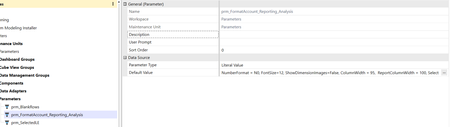
Hi all, I'm having a strange problem with cubeviews. I created some parameters to apply a standard formatting to my cube views: when I use them into the cubeview and I launch it, though, they appear in the initial popup without any value, as if they were user input params: am I missing something? is there anything I need to configure to make them work automatically? Any help is appreciated!Solved143Views0likes3Comments
Passing Entity in a Cube View Row to an XFBR in a Cube View Column
Hi all, I have an XFBR that I would like to take the entity member in any given row in a cube view. I've tried |MFEntity| but that doesn't work. |CVEntity| and |POVEntity| don't work either since they can only pass a single entity for a given cube view. Is there a way to get what I need outside of manually doing a column override for every single row in my cube view and hard coding the entity that I need to pass to the XFBR?47Views0likes0Comments
Pass through external parameters into dynamic cube view services
Hello, Is there a way to pass a combo box paramater into a cube view service? I think would be through the Service Factory. Since the cube view service runs when the cube view is executed and there is no call as XFBRs or Dashboard extenders, Is there a way to pass parameter values into the cube view service business rule?Solved110Views0likes2Comments
PowerBI Custom Data Adapter
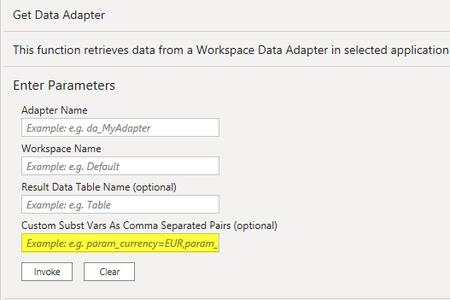
I have built a OS data adapter off of a cube view that has a parameter that prompts for entity. I subsequently built PowerBI query to pull data via this data adapter. I can get the PowerBI query to pull data if I hardcode the Entity parameter value in the Custom Subst Vars in PowerBI. What I would like to do is replace hardcoding the Entity value with list prompt for the user. That will let the user decide which entity they want to pull when they refresh the query. Any ideas on how to create this functionality? #PowerBI216Views0likes2Comments