The OneStream Community is temporarily frozen until June 29th due to the ongoing maintenance. Please read the blog post here to learn more.
Forum Discussion

JenJessel
3 years agoNew Contributor III
Text Values in Cubeview
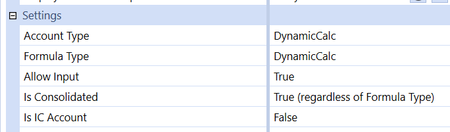
Looking for help to display Text data in a cube view. I'm using the member filter below which works for every account type EXCEPT DynamicCalc. Account Type set under Settings in the Member Proper...
- 3 years ago
From what I can see, the engine will execute Dynamic Calcs in the usual order (i.e. Account first, then Flow, then UD1, etc etc). As soon as it finds a Stored Item, even one containing only comments, it executes that and stops.
In your case, you have a formula in the Account that probably returns a number; that is executed first, and nothing else gets a chance. Since the view is an annotation, that means you get a NoData cell (as documented in the Design guide). Your UD8 formula is never executed.
If you have a Dynamic account formula, you have to place any support for Annotation views in that formula.

JackLacava OneStream Employee
3 years agoOneStream EmployeeFrom what I can see, the engine will execute Dynamic Calcs in the usual order (i.e. Account first, then Flow, then UD1, etc etc). As soon as it finds a Stored Item, even one containing only comments, it executes that and stops.
In your case, you have a formula in the Account that probably returns a number; that is executed first, and nothing else gets a chance. Since the view is an annotation, that means you get a NoData cell (as documented in the Design guide). Your UD8 formula is never executed.
If you have a Dynamic account formula, you have to place any support for Annotation views in that formula.
 JenJessel3 years agoNew Contributor III
Thank you. I added to the account formula like you said and it is now working.
 grillin72 years agoNew Contributor II
Hello JenJessel.
How are you?
I have the same issue, can you share with me how did you solve it? please
I have the following:Return api.Data.GetDataCell("A#TotalSales2 - A#TotalPrimeCost2")
thank you
- JenJessel2 years agoNew Contributor IIII added the following code to the end of my formula as I was trying to pull back the text data in Text3 as well as the formula I had before code.Dim accountId As Integer = api.Pov.account.MemberIdDim accountText3 As String = api.account.Text(accountId,3).ToStringReturn accountText3
Related Content
- 3 years ago