Forum Discussion

MarkBird
2 years agoContributor III
Add a named range to an excel export item in a book
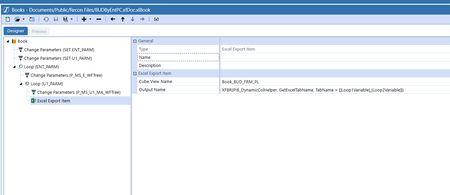
Hi We are creating a book that loops over an excel export item to create multiple tabs (see below): Is there any way to add a named range around each exported cube view? Thanks, Mark
- 2 years ago
Book definitions are too dumb to do that sort of work. The only way I can see this happening is by triggering an extender after export, to postprocess the file.

JackLacava OneStream Employee
2 years agoOneStream EmployeeSome named ranges are created by default, did you see them?
 MarkBird2 years agoContributor III
I did, but we are looking to have a custom named range.
We are trying to create a extract book that we can use as an upload template. So we are trying to create custom named ranges that start with 'xfd'.
- JackLacava2 years ago
Book definitions are too dumb to do that sort of work. The only way I can see this happening is by triggering an extender after export, to postprocess the file.
- MarkBird2 years agoContributor III
Haha!
I have actually been trying to create an excel export using a an extender business rule (using information found on this post - https://community.onestreamsoftware.com/t5/Rules/Create-Excel-spreadsheet-from-Business-Rules/m-p/24231#M2344) but I am getting an error that says 'Could not find a part of the path' when trying to create the file.
Related Content
- 7 months ago
- 4 years ago
- 2 years ago