The OneStream Community is temporarily frozen until June 29th due to the ongoing maintenance. Please read the blog post here to learn more.
Forum Discussion

JennyTan
3 months agoNew Contributor III
Genesis - CV with comments - red flag on top right
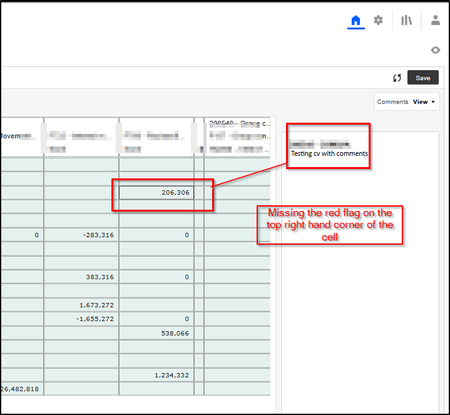
I have created a cv with comments for comments input and review. The comments are saved and viewed with success but I am missing the red flag on the cell where there is comment in the cells. See be...

JSlone OneStream Employee
3 months agoOneStream EmployeeHi Jenny,
Typically, I would want to check POV: make sure your Cube View's POV matches the Cell Member Script in the block's commentary configuration. However, based on your screenshot above, you can view stored comments just fine.
I have a couple questions for you:
If you make a data attachment directly on the Cube View (right-click on a cell, select Attachments for Selected Cell and manually enter a comment), does the indicator display? The indicator would be blue in this case since you are in the browser.
Also, does the indicator display if you open this in WinApp vs. the browser?
If you want to check the Cell Member Script just to make sure everything is aligned see below:
Cell Member Script: The Cube View Comments Block uses the Cell Member Script under Commentary Configuration to determine where to store comments.
The Cell Member script should match your Cube View POV with the exception of:
- Any Member Parameters where the Member is determined by user selection in the Cube View
- View Dimension Member
- Commentary Configuration View Member needs to be a commentary View Member such as Annotation or VarianceExplanation, etc.
- This is not required for the Cube View; that can remain YTD, Periodic, etc.

JennyTan
3 months agoNew Contributor III
Hi, Thank you so much for your quick response. I tried to do cell attachment and the cell did appear with a blue flag.
When I open this report in the client one place dashboard, the flag is red.
As for the script in the comment config, I did copy the POV information from existing cell but amended a few (bold below):
Cb#Group_Consol:E#~|EntityNavLink|~:P#?:C#CLP:S#Actual:T#~|prm_SelectTime|~:V#Annotation:A#~|AccountNavLink|~:F#~|FlowNavLink|~:O#BeforeAdj:I#Top:U1#None:U2#None:U3#None:U4#None:U5#None:U6#~|prm_SelectUD6|~:U7#None:U8#None
Default Navigation links is set as True in the cv, thus I am using the default link for entity, account and flows that are in the rows/columns in the cv.
Related Content
- 1 month ago
- 4 months ago
- 2 months ago
- 3 years ago