Genesis Home Page, Navigation to File or Website
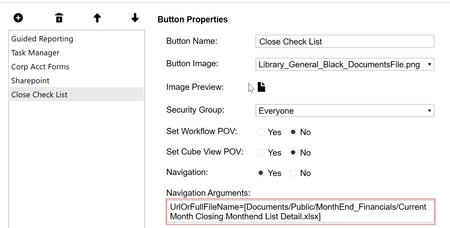
Hello everyone! Not sure if this is the right forum or not, but I am creating a very simple home page using the Genesis Home Page. Creating buttons to go to Dashboards or Workflows was not an issue, but I cannot figure out how to get the buttons to work to navigate to a document or website. Below is how I was attempting to do it. If anyone has any advice on what I am missing, it would be greatly appreciated, thank you.43Views0likes1Comment
How to Export a Dashboard
Hi Team, Generally we can export the cube view to an Excel. But when we attached the Cube view to the Dashboard through cube view component. at the time we wont find the export option. Can you please advise us. how export a dashboard(Cube view attached to dashboard).23Views0likes1CommentUnable to reference the SingleJournalDetail_ONC in the Guided Report?
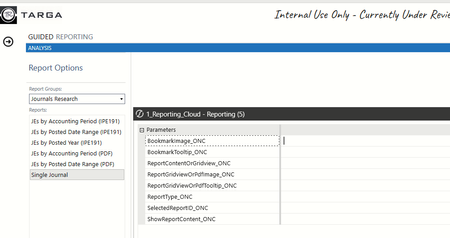
We used to be able to reference and retrieve the RPTA Audit Reports from the Guided Reporting Solution. After we upgraded the RPTA to Navigation Center, we are unable to retrieve the Single Journal Detail Report from the Guided Reporting or our custom homepage dashboard. See the prompt box displayed in the Guided Reporting when retrieving the Single Journal detail report:14Views0likes0CommentsIssue in Web Content and File Viewer component to directly open a HTML file in a browser
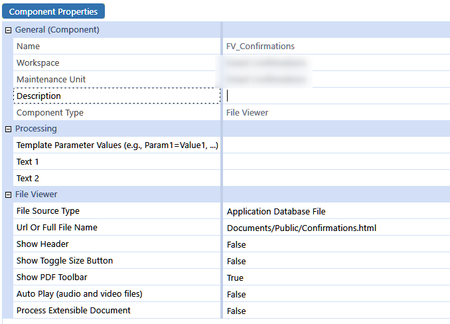
Dear community, I currently have an html document which is located in the file Explorer under "Documents/Public" folder. I am trying to get this HTML document to be presented into the components, embedded in a dashboard. However, with either a Web Content component or a File Viewer component (which will pinpoint to this specific file in Application Database File, as soon as I open the dashboard, it will load the html page into my default browser... I am using OS v8.1 ... is it a known bug or the expected behaviour ? What is even more strange, directing the Full File Name to a URL will correctly open a document in a dashboard ... Regards,3.3KViews0likes13Comments
MergeAndCenterColumnHeaders in Cube Views
Hi, Anyone on Version 8 who's actually tried to use this 'enhancement' feature in Cube Views? We requested this on Ideastream a long time ago with a lot of support. I can see this command is now available in the header format dialog; however, it would appear that the only thing it does is change the header from left justified to center view. There does not seem to be a way to actually 'merge' column headers, despite the fact that it's called "MergeAndCenter". Even the system documentation appears to confirm this behavior. Someone please tell me I'm missing something here and it actually is possible to merge column headers, because we really really wanted this feature. Thanks764Views2likes11Comments
Environment Application Count Dashboard
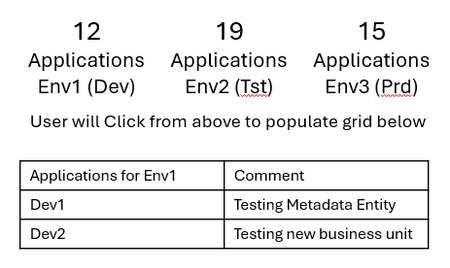
Our users are wanting to know how many applications are in each environment, then show the applications under each environment by clicking on the environment, plus the ability to enter a comment next to the application. Similar to the Cloud Admin Tool, Applications on top, user would click the environment, the grid would then show the applications. A text field next to the application name where they could input a comment. Any thoughts on how this could be done? Appreciate it in advance!18Views1like0CommentsReturning text from a BR# inside GetDataCell — possible?
I'm building a cube view column that shows combined annotations from descendants. I'm calling an Finance Cell Service BR from inside GetDataCell so I can pass dashboard params needed for the logic. GetDataCell(T#|CVTime|:BR#[BRName=..., FunctionName=CombinedComment, Flux_ID = {fluxID}]:U8#{ud8}):Name({ud8} Combined). I need to the UD8 POV member because that distinguishes what type of comment it is (CMvsPM, CQvsPQ, CMvsPYM, Ect...). The BR returns a String, but GetDataCell expects a numeric amount so the text doesn't render in the cell. Pointing the column at V#Annotation doesn't help either. Has anyone gotten BR-returned text to display in a GetDataCell with full POV/param context? Thanks, Ben91Views0likes1Comment- 43Views0likes1Comment
Genesis Upgrade
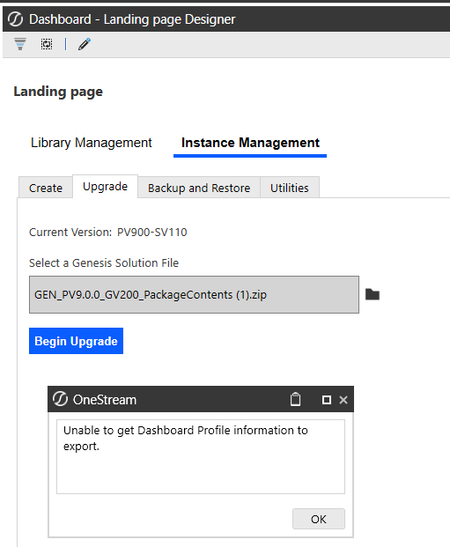
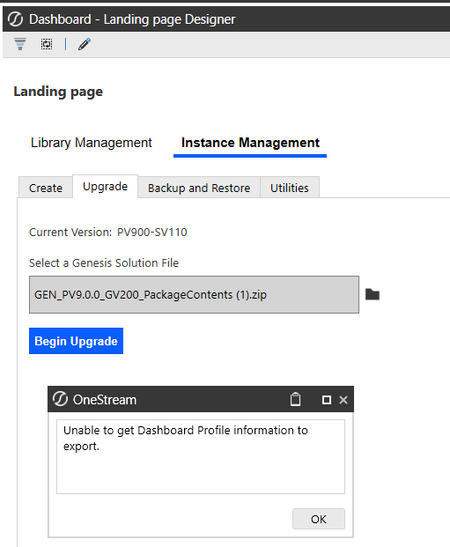
Hi all, I’m currently upgrading instances of Genesis-created workspaces and ran into an issue. The workspace named "Genesis" was upgraded successfully. However, the ones with different names are failing and returning the error below. For example, one of the affected workspaces is named "Landing Page." I’m not sure if the naming is related to the issue, but it’s the main difference I’ve noticed so far. Has anyone encountered something similar or knows how to resolve this? I’d really appreciate any guidance.Solved79Views0likes2Comments