Forum Discussion

JennyTan
4 months agoNew Contributor III
Genesis - User action to refresh another cv basic
Hi, I am trying to create a genesis dashboard that will have a main cv (1105) which shows overview and then when user click on the cell, it will filter another cv (1106) (probably cv basic since it ...
 3 months ago
Hello,
This can be done in Genesis using the Cube View with Layouts and Cube View Advanced Embedded.
(if you're using a local Genesis Instance, please check the Solution Exchange and ensure you have the latest version of both blocks)Before you begin in Genesis, confirm your Cube View setup:
- Navigation Links:
when using NavLinks in Genesis, you must use OneStream's default NavLink Parameters (EntityNavLink, TimeNavLink,...etc.)- Main Cube View: confirm 'Include Default NavLink Parameters' property set to True
- Sub Cube View: Use Default Nav Links on the Dimensions that are driven by the main cube view
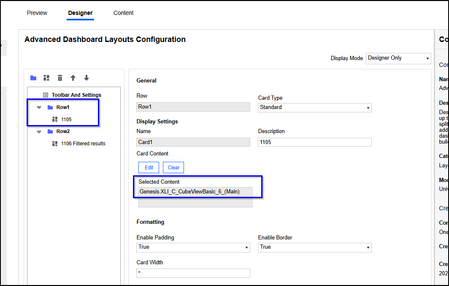
- Inject the Cube View with Layouts Block and assign your 'main Cube View' to that block.
- Under the Layouts Tab, select the Layout you want; make sure it has at least two content cards.
- Assign the Main Cube View to the content card you want and then inject the Cube View Advanced Embedded Block to the one of the content cards.
- Check the respective card number for On Click Refresh (sub Cube View)
- Click edit on the cube view advanced block and assign the sub Cube View. Set the Filter Bar to Hide and save.
- Note: you may receive a prompt that there are unsupported Parameters; that's fine. Just click OK. The block can't recognize nav links on their own.
- Preview your content and the selection you make in the main cube view will now refresh the card of the sub cube view displaying updated data
- Navigation Links:

JennyTan
4 months agoNew Contributor III
The example that works which have them in separate pages in genesis, I was using the link that ends with "XLI_~KitD_CubeViewBasic_5_txb_DescOrInfoinput"
I tried using the same but using KitD_CubeViewBasic_7 but it did not work.
Related Content
- 1 month ago
- 4 months ago
- 3 months ago
- 9 months ago