Forum Discussion

JennyTan
4 months agoNew Contributor III
Genesis - User action to refresh another cv basic
Hi, I am trying to create a genesis dashboard that will have a main cv (1105) which shows overview and then when user click on the cell, it will filter another cv (1106) (probably cv basic since it ...
 3 months ago
Hello,
This can be done in Genesis using the Cube View with Layouts and Cube View Advanced Embedded.
(if you're using a local Genesis Instance, please check the Solution Exchange and ensure you have the latest version of both blocks)Before you begin in Genesis, confirm your Cube View setup:
- Navigation Links:
when using NavLinks in Genesis, you must use OneStream's default NavLink Parameters (EntityNavLink, TimeNavLink,...etc.)- Main Cube View: confirm 'Include Default NavLink Parameters' property set to True
- Sub Cube View: Use Default Nav Links on the Dimensions that are driven by the main cube view
- Inject the Cube View with Layouts Block and assign your 'main Cube View' to that block.
- Under the Layouts Tab, select the Layout you want; make sure it has at least two content cards.
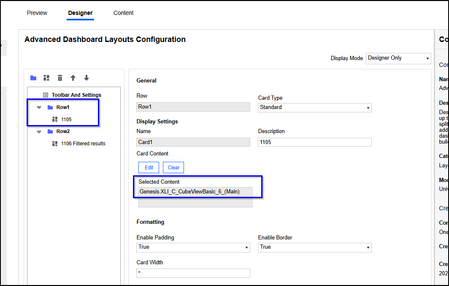
- Assign the Main Cube View to the content card you want and then inject the Cube View Advanced Embedded Block to the one of the content cards.
- Check the respective card number for On Click Refresh (sub Cube View)
- Click edit on the cube view advanced block and assign the sub Cube View. Set the Filter Bar to Hide and save.
- Note: you may receive a prompt that there are unsupported Parameters; that's fine. Just click OK. The block can't recognize nav links on their own.
- Preview your content and the selection you make in the main cube view will now refresh the card of the sub cube view displaying updated data
- Navigation Links:

JennyTan
3 months agoNew Contributor III
Hi, I tried to use cv with layout but it seems like this content block is not very stable. Sometimes the sub cv will refresh based on a click on the main cv but sometimes it requires a manual refresh (click on the refresh button in the content block) of the sub cv before it will refresh - even though I am selecting the click refresh according to your step 4 above.
JennyTan
3 months agoNew Contributor III
I tried several options of "click refresh" with the three cards using cv with layout to test out what you wrote. This is not working out the way you wrote.
I have to fall back to Advanced dashboard and then inserting the two cv as advanced embedded as card 1, card 2 in row1. Card 1 is the one with refresh with click in the main cv while card 2 is sub cv does not have refresh. Only then, by clicking the cell in main cv will refresh sub cv automatically.
- JSlone3 months ago
OneStream Employee
We recently made enhancements to this block for that very reason; if you are not connected to the Block Library, make sure you're using the latest version of the block. There was a new version just recently released in the last day or so that you can download now from Solution Exchange.
- JennyTan3 months agoNew Contributor III
Hi, I just checked. The library was updated on 6th Mar for this block. I just tested it and it is finally working as per your written post. Thanks!
Related Content
- 1 month ago
- 4 months ago
- 3 months ago
- 9 months ago