The OneStream Community is temporarily frozen until June 29th due to the ongoing maintenance. Please read the blog post here to learn more.
Forum Discussion

Rianne
2 years agoNew Contributor II
Graphs x-axis tabels - Date Time Scale Options
Dear community,
I am working on a graph that shows the daily FX rates.
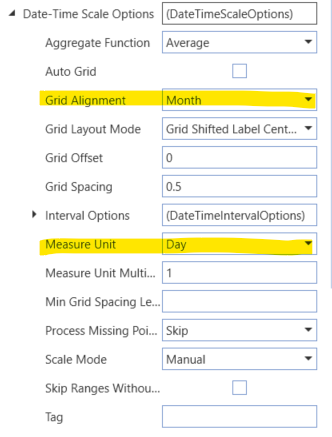
I am bringing the data in through an SQL Data Adapter and have set up the following settings in regard to the data and what...
- 2 years ago
This led me to some unknown places, so thank you 😉
First, select your axis by clicking on it; then look for the Label ▶ Text Pattern property to set your custom pattern. Click on the ellipsis to open the editor; basically you select Argument, then one of the prebuilt formats, and you can then manually customize it simply by typing in the central area.
The result can be seen below (hopefully - I know it's a bit small).

aelmehelmi
2 years agoNew Contributor II
That is very useful. Do you think I can achieve the same in an advanced chart component?
Tried the following but did not work, when I change the argument type to Date Time the custom formatting works but I get the x-axis showing a 3-month interval, instead of 1 month.
thanks!

JackLacava OneStream Employee
2 years agoOneStream EmployeeDashboard Advanced Charts are a bit of a black art, I'm not sure... I suspect it might have something to do with how much space the chart decides is available, reacting to smaller areas by collapsing periods. Maybe try expanding the horizontal space dedicated to the chart and see if it changes.
There might be something more about it https://amzn.to/3YCjVI6 but I honestly don't know.
Related Content
- 3 years ago
- 4 years ago
- 4 years ago
- 2 years ago