The OneStream Community is temporarily frozen until June 29th due to the ongoing maintenance. Please read the blog post here to learn more.
Forum Discussion

seangly
2 years agoNew Contributor III
How to retrieve data on a selected row from a grid view inside a dashboard by clicking a button
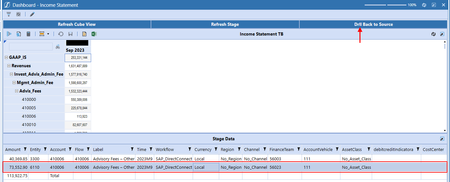
I am looking to extract the data of a selected row in a grid view by click a button inside a dashboard;
 2 years ago
Hi seangly
Had another thought on this....
If you don't have a column in stage that that uniquely identify each record in stage then you can just create a column in your data adapter that is a concatenation of the key columns in your table. E.g. (Account|Entity|Flow|UD1...) and set this as the column for the bound parameter.
(Hide the column using column formats)
In your business rule, you can extract this information using a string.split e.g.:
Dim items() As String = rowID.Split("|")

Dim sAccount As String = items(0)
Dim sEntity As String = items(1)
Dim sFlow As String = items(2)
Dim sUD1 As String = items(3)
MarkBird
2 years agoContributor III
Hi seangly
Does your question relate specifically to to refreshing the stage data grid on the button click? Or are you asking for detailed steps on how to do it (looks like you are almost there with that screenshot)?
Very high level, the steps are as follows:
1) Setup navigation/bound parameters on the cube view (this will help tell your SQL query the selected cell's POV)
2) Create a data adapter to retrieve the data (here is an example of how you can call a business rule data adapter)
{TXN_HelperQueries}{GetDrillBackData}{wfProfile=|WFProfile|, wfPeriod=|WFTime|, Scenario=|!ScenarioNavLink!|, TimeParent=|!TimeNavLink!|, EntityParent=|!EntityNavLink!|, AccountParent=|!AccountNavLink!|,UD1Parent=|!UD1NavLink!|,View=|!ViewNavLink!|}
3) Configure the button to refresh the drill back dashboard on button click
Hope this is helpful, happy to provide more details on any of the steps that you're struggling with.
Mark
 seangly2 years agoNew Contributor III
Hi Mark,
Thank for your reply. I have completed that portion using the link to get the correct data to get to source.
Here is the next step I am trying to accomplish. Once the drill back to Stage data (Workflow) come back with the data source, I am displaying the value into a grid view the:
Now, when the user selects a line in the grid view (which is the result of the drill back to Stage data) and click on that button. I would like to get values from that selected line on the grid view (Account, Entity, UD1, etc.) so I can build me request to drill back to the source (e.g. Oracle EBS).
I hope that clarify what I am trying to accomplish.
Thank
- MarkBird2 years agoContributor III
Ah okay, I understand now.
You can do something similar with the bound parameters, however, with the grid view you can only have one column as the bound parameter so you would need to have a Row ID or unique identifier for each row in your grid view:
You would then pass through the row ID parameter to your business rule the same way as before:
{MyBusinessRule}{DrillToSourceFunction}{rowID=|!Selected_RowID!|}- MarkBird2 years agoContributor III
Hi seangly
Had another thought on this....
If you don't have a column in stage that that uniquely identify each record in stage then you can just create a column in your data adapter that is a concatenation of the key columns in your table. E.g. (Account|Entity|Flow|UD1...) and set this as the column for the bound parameter.
(Hide the column using column formats)
In your business rule, you can extract this information using a string.split e.g.:
Dim items() As String = rowID.Split("|")

Dim sAccount As String = items(0)
Dim sEntity As String = items(1)
Dim sFlow As String = items(2)
Dim sUD1 As String = items(3)
- jwagner1 year agoNew Contributor III
Hi Mark where can I download this TXN_HelperQueries Business Rule?

Related Content
- 4 months ago
- 2 years ago
- 3 years ago