Forum Discussion

giutor73
3 years agoNew Contributor III
Bi Viewer - Image component - Binary Array
Hi,
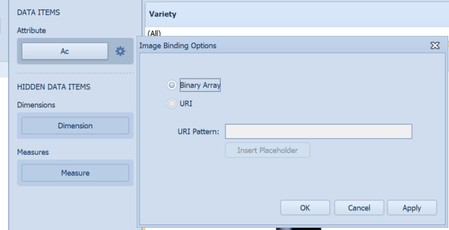
does anyone have a clue on how to use the Binary Array facility inside the Image component in a BI Viewer? I couldn't find anything in the documentation apart a simple mention. How do I actuall...
- 3 years ago
Yes. In your case, I think what you want is the URI option. You can put all your images on a webserver somewhere, named after the possible contents of that field (e.g. "account1.png"), then specify the URI option with something like "https://example.com/images/{0}.png". When the field contains the value "account1", the component will contain the image at https://example.com/images/account1.png .

giutor73
3 years agoNew Contributor III
Thank for replying. So only one image can be bound then? I have to display a different image according to the content of the field.

JackLacava OneStream Employee
3 years agoOneStream EmployeeYes. In your case, I think what you want is the URI option. You can put all your images on a webserver somewhere, named after the possible contents of that field (e.g. "account1.png"), then specify the URI option with something like "https://example.com/images/{0}.png". When the field contains the value "account1", the component will contain the image at https://example.com/images/account1.png .
- giutor733 years agoNew Contributor III
Yep I did this way.
Thanks Jack! ckattookaran3 years agoValued Contributor
I know you already got the answer, however another way to do this will be to create a table and load the image binary as varbinary into the table, once you have that you can use it in BI viewer and change it based on the row selection.
Related Content
- 5 months ago
- 2 years ago
- 1 year ago