Forum Discussion

AndreaF
3 years agoContributor III
Return the parent member using XFGetHierarchyProperty function
Hi,
I am trying to use the XFGetHierarchyProperty Spreadsheet function to return the "Parent member name" property of a member.
I tested the function by returning the HasChildren property...
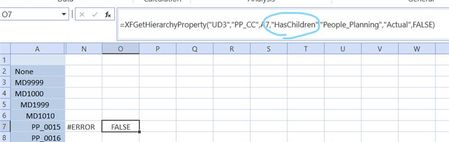
 3 years ago
Thank you for your reply. Since the parent member is a relationship property, looking at the XFGetRelationshipProperty function probably makes more sense. However, as you pointed out a member can have multiple parents. Looking in the dimension library I believe the properties that are greyed out can be used to identify the relationship, but cannot be retrieve using the XFGetRelationshipProperty function, while what is not greyed out can be retrieved with the XFGetRelationshipProperty function.

SxD
1 year agoNew Contributor III
Hi Andrea,
Curious if since your post you've tried to find other ways to do this or not? I need to return a similar result and format of the member and parent. Thinking I might have to do a tree of the hierarchy and do some Excel wizardry.
AndreaF
1 year agoContributor III
Hi, if you want something more robust and structured (although it will probably take a bit more time then just extracting the hierarchy in Excel and using Vlookups), you could write a Data Set business rule, and use the rule as a Method in a Bound List parameter to test and extract the output of the Data Set.
Related Content
- 1 year ago
- 3 years ago
- 2 years ago