The OneStream Community is temporarily frozen until June 29th due to the ongoing maintenance. Please read the blog post here to learn more.
Forum Discussion

amwitmer
1 year agoNew Contributor
Save Offline Copy
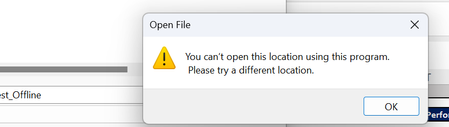
I'm getting the below error message regarding location when trying to save a file with multiple XFGetCell formulas offline. I've updated my preferences that an earlier question showed as a solution ...

Clarke_Hair
9 months agoContributor
Some of my users have this issue tied with the Search bar not working until you open a doc and go back. Here is what OS was trying to get me to look into. Got to be too time consuming to work so just told my users to click through it and they are still able to find the right file location, just have to deal with the annoying popup. This started back when we went from 8.2 to 8.5. We are on 9.0.1 and i have stopped getting the popup and my initial search bar is now working correctly so I assume our upgrade install fixed the issue.
It looks like a group policy is kicking in and disabling the research task pane when installing the Addin; curious to know if you discussed this internally with your IT Infrastructure Team to see if they have a Security Group Policy in place causing that research task pane feature being disabled and the other issue with the windows popup message that gets generated when you try to open an excel sheet using Onestream Excel from files saved and opened in a share or OneDrive?
Related Content
- 4 months ago
- 2 years ago
- 2 years ago